yarn add react-native-background-geolocationnpm install react-native-background-geolocation --save$ cd ios
$ pod installOpen the Xcode project ios/Runner/Runner.xcworkspace
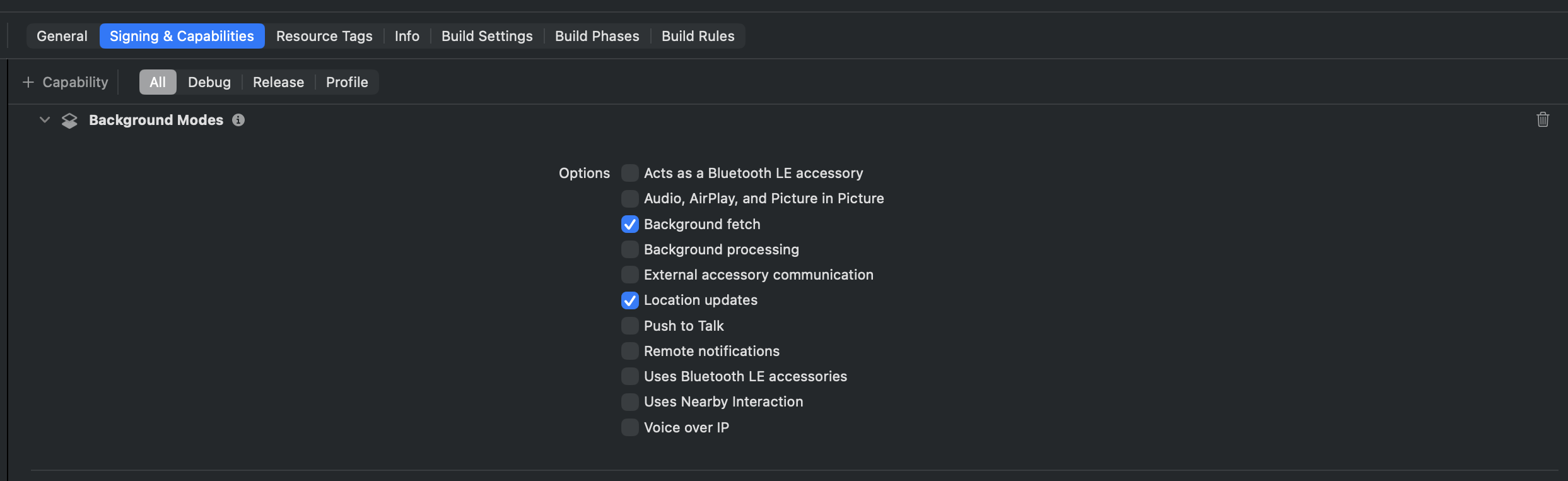
- Enable the background modes:
- Location updates
- Background fetch
- Audio ( ℹ️ optional for debug-mode sound FX )
Edit Info.plist. Add the following items (Set Value as desired):
| Key | Type | Value |
|---|---|---|
Privacy - Location Always and When in Use Usage Description |
String |
CHANGEME: Location required in background |
Privacy - Location When in Use Usage Description |
String |
CHANGEME: Location required when app is in use |
Privacy - Motion Usage Description |
String |
CHANGEME: Motion permission helps detect when device in in-motion |

Note
If you've not purchased a license, ignore this step — the plugin is fully functional in DEBUG builds so you can try before you buy.
In your Info.plist, add the following key:
| Key | Type | Value |
|---|---|---|
TSLocationManagerLicense |
String |
<PASTE YOUR LICENSE KEY HERE> |
The Background Geolocation SDK has internal handling for periodic Background Fetch events (if enabled). It can use these periodic events to gather current state information (is the device moving?), evaluating the schedule (if you've configured one) or checking if there are any location records in the queue, waiting to be uploaded to your configured url:
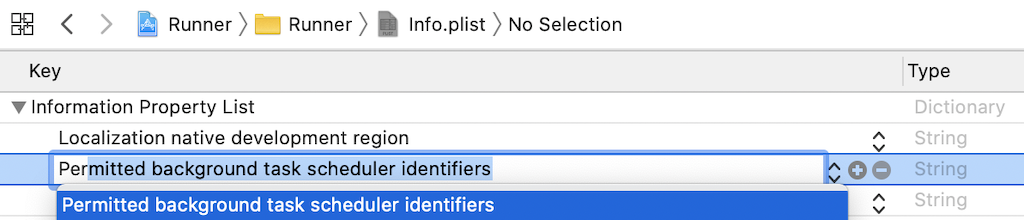
- Open your
Info.plistand add the key "Permitted background task scheduler identifiers"
| Key | Type | Value |
|---|---|---|
Permitted background task scheduler identifiers |
Array |
|
Item 0 |
String |
com.transistorsoft.fetch |
- Add the required identifier
com.transistorsoft.fetch.

- Configure in your
AppDelegate(findAppDelegate.swiftORAppDelegate.m):
import UIKit
import React
import React_RCTAppDelegate
import ReactAppDependencyProvider
+import TSBackgroundFetch

@main
class AppDelegate: UIResponder, UIApplicationDelegate {

  func application(
    _ application: UIApplication,
    didFinishLaunchingWithOptions launchOptions: [UIApplication.LaunchOptionsKey: Any]? = nil
  ) -> Bool {
    .
    .
    .
+   // [REQUIRED] Transistorsoft
+   TSBackgroundFetch.sharedInstance()?.didFinishLaunching()
    .
    .
    .
    return true
  }
}#import "AppDelegate.h"
#import <React/RCTBridge.h>
#import <React/RCTBundleURLProvider.h>
#import <React/RCTRootView.h>
+#import <TSBackgroundFetch/TSBackgroundFetch.h>
@implementation AppDelegate
(BOOL)application:(UIApplication *)application didFinishLaunchingWithOptions:(NSDictionary *)launchOptions {
.
.
.
+ // [REQUIRED] Transistorsoft
+ [[TSBackgroundFetch sharedInstance] didFinishLaunching];
return YES;
}Transistor Software manages a helpful free plugin you can optionally add to your app named react-native-background-fetch.
Tip
react-native-background-fetch is helpful for executing a periodic task (eg: every 15 minutes). You could use it to periodically request the current location, for example:
// Execute a task about every 15 minutes:
BackgroundFetch.configure({
  minimumFetchInterval: 15
}, async (taskId) => { // <-- This is your periodic-task callback
  const location = await BackgroundGeolocation.getCurrentPosition({
    samples: 3,
    extras: {   // <-- your own arbitrary meta-data
      "event": "getCurrentPosition"
    }
  });
  console.log('[getCurrentPosition]', location);
  BackgroundFetch.finish(taskId);   // <-- signal that your task is complete
});