| title | Presentation API 4.0 | ||||||||||||||||||||||||||||||||||||||||||
|---|---|---|---|---|---|---|---|---|---|---|---|---|---|---|---|---|---|---|---|---|---|---|---|---|---|---|---|---|---|---|---|---|---|---|---|---|---|---|---|---|---|---|---|
| title_override | IIIF Presentation API 4.0 | ||||||||||||||||||||||||||||||||||||||||||
| id | presentation-api | ||||||||||||||||||||||||||||||||||||||||||
| layout | spec | ||||||||||||||||||||||||||||||||||||||||||
| cssversion | 3 | ||||||||||||||||||||||||||||||||||||||||||
| tags |
|
||||||||||||||||||||||||||||||||||||||||||
| major | 4 | ||||||||||||||||||||||||||||||||||||||||||
| minor | 0 | ||||||||||||||||||||||||||||||||||||||||||
| patch | 0 | ||||||||||||||||||||||||||||||||||||||||||
| pre | |||||||||||||||||||||||||||||||||||||||||||
| redirect_from |
|
||||||||||||||||||||||||||||||||||||||||||
| editors |
|
||||||||||||||||||||||||||||||||||||||||||
| hero |
|
{:.no_toc} This Version: {{ page.major }}.{{ page.minor }}.{{ page.patch }}{% if page.pre != 'final' %}-{{ page.pre }}{% endif %}
Latest Stable Version: [{{ site.data.apis.presentation.latest.major }}.{{ site.data.apis.presentation.latest.minor }}.{{ site.data.apis.presentation.latest.patch }}][prezi-stable-version]
Previous Version: [3.0][prezi30]
Editors:
{% include api/editors.md editors=page.editors %}
{% include copyright.md %}
The purpose of the IIIF Presentation API specification is to provide a model and JSON serialization format of that model.
It provides a document format---the IIIF Manifest---for cultural heritage organizations (and anyone else) to present objects in a standardized, interoperable way. This allows compatible software such as viewers and annotation tools to load and present complex digital objects on the web from thousands of different providers.
If you have existing images, audio, video and models on the web, you can easily provide IIIF Manifests for them by publishing the appropriate JSON documents.
The IIIF Presentation API is concerned with enabling user experiences---providing enough information to present objects in compatible software, and leaving the meaning of the objects to external descriptive metadata standards.
This document acts as an introduction to the specification through a set of typical (but non-exhaustive) use cases. The Presentation API 4.0 Properties document provides the formal specification of the model and terms used in this introduction.
- Artwork - a Manifest that represents a painting, comprising a single image and accompanying display information.
- Book - a Manifest that represents a digitized bound volume made up many separate images in order. The IIIF model provides structural elements to indicate the chapters. The text of the book is made available in machine-readable form as Web Annotations.
- Periodical - a IIIF Collection that provides multiple child Collections and Manifests, representing the publication run of a newspaper over many years. The IIIF model provides structural elements to indicate individual articles and other elements.
- 45 Single - a Manifest that represents the digitized audio from the two sides of a vinyl 7 inch record.
- Movie - a Manifest that represents the digitized video of a film. A transcript of the audio is provided as Web Annotations, and additional machine-readable files provide subtitles and captions.
- Simple 3D Model - a Manifest that publishes a single 3D model.
- Complex Scene - a Manifest that publishes a complex 3D scene comprising multiple models, lights and cameras.
- Storytelling in 3D - a Manifest that defines a sequence of states in a complex scene for the purposes of guiding a user through a particular experience.
These use case were chosen as a broad sample to introduce IIIF concepts. Many more use cases are provided as recipes in the IIIF Cookbook.
TODO Consider diagrams
This section is what you need to know to make sense of the examples that follow it.

A Manifest is the primary unit of distribution of IIIF. Each Manifest usually describes how to present an object, such as a book, statue, music album or 3 dimensional scene. It is a JSON document that carries information needed for the client to present content to the user, such as a title and other descriptive information. The scope of what constitutes an object, and thus its Manifest, is up to the publisher of that Manifest. The Manifest contains sufficient information for the client to initialize itself and begin to display something quickly to the user.
The Manifest's [items][prezi-40-model-items] property is an ordered list of Containers of Content Resources (images, 3D models, audio, etc). Client software loads the Manifest and presents each Container's Content Resources. The client software also presents user interface controls to navigate the list of Content Containers.
Manifests have descriptive, technical and linking properties. The required properties of Manifests are [id][prezi-40-model-id], [type][prezi-40-model-type], [items][prezi-40-model-items] and [label][prezi-40-model-label]. Other commonly used properties include [summary][prezi-40-model-summary], [metadata][prezi-40-model-metadata], [rights][prezi-40-model-rights], [thumbnail][prezi-40-model-thumbnail], [homepage][prezi-40-model-homepage] and [provider][prezi-40-model-provider].
A Container is a frame of reference that allows the relative positioning of Content Resources, a concept borrowed from standards like PDF and HTML, or applications like Photoshop and PowerPoint, where an initially blank display surface has images, video, text and other content "painted" on to it. The frame is defined by a set of dimensions, with different types of Container having different dimensions. This specification defines three sub-classes of Container: Timeline (which only has a duration), Canvas (which has bounded height and width, and may have a duration), and Scene (which has infinite height, width and depth, and may have a duration).
The required properties of all Containers are [id][prezi-40-model-id], and [type][prezi-40-model-type]. Most Containers also have the [items][prezi-40-model-items] and [label][prezi-40-model-label] properties. Further properties are required for the different types of Container.
The defined Container types are:
A Container that represents a bounded temporal range, without any spatial coordinates. It is typically used for audio-only content.
Timelines have an additional required property of [duration][prezi-40-model-duration], which gives the extent of the Timeline as a floating point number of seconds.
{% include code_example.html src="02_timeline.json" from=11 to=35 %}
A Container that represents a bounded, two-dimensional space, optionally with a bounded temporal range. Canvases are typically used for Image and Video content.
Canvases have two additional required properties: [height][prezi-40-model-height] and [width][prezi-40-model-width], which give the spatial extent as integers. Canvases may also have the [duration][prezi-40-model-duration] property in the same manner as Timelines.
{
"id": "https://example.org/iiif/presentation/examples/manifest-with-containers/canvas",
"type": "Canvas",
"width": 12000,
"height": 9000,
"items": [
{
"id": "https://example.org/iiif/presentation/examples/manifest-with-containers/page/p2",
"type": "AnnotationPage",
"items": [
{
"id": "https://example.org/iiif/presentation/examples/manifest-with-containers/annotation/c1",
"type": "Annotation",
"motivation": [ "painting" ],
"body": {
"id": "https://iiif.io/api/presentation/example-content-resources/image/painting.jpg",
"type": "Image",
"format": "image/jpeg",
"width": 4000,
"height": 3000
},
"target": "https://example.org/iiif/presentation/examples/manifest-with-containers/canvas"
}
]
}
]
}A Container that represents a boundless three-dimensional space, optionally with a bounded temporal range. Scenes are typically used for rendering 3D models, and can additionally have Cameras and Lights.
Scenes may also have the [duration][prezi-40-model-duration] property in the same manner as Timelines.
{
"id": "https://example.org/iiif/presentation/examples/manifest-with-containers/scene",
"type": "Scene",
"items": [
{
"id": "https://example.org/iiif/presentation/examples/manifest-with-containers/page/p3",
"type": "AnnotationPage",
"items": [
{
"id": "https://example.org/iiif/presentation/examples/manifest-with-containers/annotation/s1",
"type": "Annotation",
"motivation": [ "painting" ],
"body": {
"id": "https://iiif.io/api/presentation/example-content-resources/models/astronaut.glb",
"type": "Model",
"format": "model/gltf-binary"
},
"target": "https://example.org/iiif/presentation/examples/manifest-with-containers/scene"
}
]
}
]
}Scenes can have time-based and image content in them as well as 3D content. See model for how to do this.
IIIF uses the concept of Annotation to link resources together from around the web. This specification uses a World Wide Web Consortium (W3C) standard for this called the [Web Annotation Data Model][org-web-anno]. This is a structured linking mechanism useful for making comments about Content Resources, but IIIF's primary use of it is to associate the images, audio and other Content Resources with their Containers for presentation.
In each of the three Containers above, an Annotation links the Container to a Content Resource. The Content Resource in the [body][prezi-40-model-body] property is painted into the Container by an Annotation whose [target][prezi-40-model-target] property is the [id][prezi-40-model-id] of the Container. In all three simple cases here the [target][prezi-40-model-target] property is the [id][prezi-40-model-id] of the Container with no further qualification.
Different uses of Annotation are distinguished through their [motivation][prezi-40-model-motivation] property. This specification defines a value for [motivation][prezi-40-model-motivation] called painting for associating Content Resources with Containers, which this specification calls a Painting Annotation. The verb "paint" is also used to refer to the associating of a Content Resource with a Container by a Painting Annotation. This is from the notion of painting onto a canvas, a metaphor borrowed from art and used for image-based digital applications, and expanded by IIIF into "painting" any Content Resource into a Container of any number of dimensions.
The same linking mechanism is also used in IIIF with other motivations for transcriptions, commentary, tags and other content. This provides a single, unified method for aligning content, and provides a standards-based framework for referencing parts of resources. As Annotations can be added later, it promotes a distributed system in which further content such as commentary can be aligned with the objects published on the web.
Annotations are grouped within the [items][prezi-40-model-items] property of an Annotation Page, and the [items][prezi-40-model-items] property of the Container is a list of Annotation Pages. This allows consistent grouping of Annotations when required.
Content Resources are external web resources, including images, video, audio, 3D models, data, web pages or any other format. Typically these are the resources that will be painted into a Container using a Painting Annotation.
In addition to the required properties [id][prezi-40-model-id] and [type][prezi-40-model-type], other commonly used properties include [format][prezi-40-model-format], and [width][prezi-40-model-width], [height][prezi-40-model-height] and [duration][prezi-40-model-duration] as appropriate to the Content Resource format. The values of these properties are often the source of the equivalent Container properties.
Containers may also be treated as Content Resources and painted into other Containers. This allows composition of content, such as painting a Canvas bearing a Video into a Scene, or painting a 3D model along with its associated Lights into an encompassing Scene. This capability is described further in nesting.
A common scenario is to refer to only part of a resource, either a Container or a Content Resource. There are two primary methods for achieving this: adding a fragment to the end of the URI for the resource, or creating a Specific Resource that describes the method for selecting the desired part.
Parts of resources on the Web can be identified using URIs with a fragment component that both describes how to select the part from the resource, and, as a URI, also identifies it. In HTML this is frequently used to refer to part of the web page, called an anchor. The URI with the fragment can be used in place of the URI without the fragment in order to refer to this part.
There are different types of fragment based on the format of the resource. The most commonly used type in IIIF is the W3C's Media Fragments specification, as it can define a temporal and 2D spatial region.
{
"id": "https://example.org/iiif/presentation/examples/manifest-with-containers/comments/c1",
"type": "Annotation",
"motivation": [ "commenting" ],
"body": {
"id": "https://example.org/iiif/presentation/examples/manifest-with-containers/bodies/koto-body",
"type": "TextualBody",
"value": "Koto with a cover being carried",
"language": "en",
"format": "text/plain"
},
"target": "https://example.org/iiif/presentation/examples/manifest-with-containers/canvas#xywh=6050,3220,925,1250"
}Here the Canvas [id][prezi-40-model-id] from the earlier example is still the [target][prezi-40-model-target] of an Annotation, but it has been qualified to a specific region of that Canvas by a URI fragment #xywh=6050,3220,925,1250. Note that the x, y, w, and h are in the Canvas coordinate space, not the image pixel dimensions space. This annotation has no knowledge of or dependency on the particular image we painted onto the Canvas; we could replace that image with one of a different, higher resolution without affecting this annotation or the region of the Canvas it targets.
URIs with fragments are insufficient for complex referencing, like circular regions or arbitrary text spans, and do not support other useful features such as describing styling or transformation. The Web Annotation Data Model introduces a class called [SpecificResource][prezi-40-model-SpecificResource] that represents the resource in a specific context or role, which IIIF uses to describe these more complex requirements.
Several different classes of Selector are used in IIIF, including an alternative implementation of the fragment pattern called [FragmentSelector][prezi-40-model-FragmentSelector]. The fragment is given in the value property of the [FragmentSelector][prezi-40-model-FragmentSelector], and the resource it should be applied to is given in [source][prezi-40-model-source].
The required properties of Specific Resources are [id][prezi-40-model-id], [type][prezi-40-model-type], and [source][prezi-40-model-source]. Other commonly used properties include selector, [transform][prezi-40-model-transform], and scope.
The fragment example above can be expressed using a Specific Resource:
{
"id": "https://example.org/iiif/presentation/examples/manifest-with-containers/comments/c1",
"type": "Annotation",
"motivation": [ "commenting" ],
"body": {
"id": "https://example.org/iiif/presentation/examples/manifest-with-containers/bodies/koto-body",
"type": "TextualBody",
"value": "Koto with a cover being carried",
"language": "en",
"format": "text/plain"
},
"target": {
"id": "https://example.org/iiif/presentation/examples/manifest-with-containers/resources/koto-sr",
"type": "SpecificResource",
"source": {
"id": "https://example.org/iiif/presentation/examples/manifest-with-containers/canvas",
"type": "Canvas"
},
"selector": {
"id": "https://example.org/iiif/presentation/examples/manifest-with-containers/selectors/koto-selector",
"type": "FragmentSelector",
"value": "xywh=6050,3220,925,1250"
}
}
}Navigational resources provide structure for IIIF resources that allow viewing clients to guide users through IIIF content and collections. They define how resources are organized for discovery and interaction across multiple resources, like Collections, or within a resource, like Ranges, that help clients construct meaningful navigational interfaces, such as hierarchies, groupings, lists, or tables of contents.
IIIF Collections are ordered lists of Manifests and Collections. Collections allow these resources to be grouped in a hierarchical structure for navigation and other purposes.
Collections may include both other Collections and Manifests, forming a tree-structured hierarchy that expresses relationships among IIIF resources. This organization can represent archival or curatorial structures, logical groupings such as volumes or series, or dynamically generated sets of related items. As such, they enable clients to load predefined sets of resources at initialization, render dynamically generated sets such as search results, visualize lists or hierarchies of related content, and facilitate navigation through structured aggregations of Manifests and Collections.
{
"id": "https://iiif.example.org/collection/top",
"type": "Collection",
"label": { "en": ["Top-level Collection"] },
"items": [
{
"id": "https://iiif.example.org/collection/sub1",
"type": "Collection",
"label": { "en": ["Sub-Collection 1"] }
},
{
"id": "https://iiif.example.org/manifest/1",
"type": "Manifest",
"label": { "en": ["Manifest 1"] }
},
{
"id": "https://iiif.example.org/manifest/2",
"type": "Manifest",
"label": { "en": ["Manifest 2"] }
}
]
}👀
IIIF Ranges are used to represent structure WITHIN a Manifest beyond the default order of the Containers in the [items][prezi-40-model-items] property. Ranges define meaningful divisions or sequences---such as chapters in a book, sections of a newspaper, or movements of a musical work---that allow clients to present hierarchical or linear navigation interfaces that enable the user to quickly move through the object's content.
Ranges may include Containers, parts of Containers via Specific Resources or fragment URIs, or other Ranges, creating tree-like structures that reflect the logical or intellectual organization of the resource, such as a table of contents or an alternative ordering of items.
{
"id": "https://iiif.example.org/manifest/1/range/toc",
"type": "Range",
"label": { "en": ["Table of Contents"] },
"items": [
{
"id": "https://iiif.example.org/manifest/1/canvas/1",
"type": "Canvas",
"label": { "en": ["Page 1"] }
},
{
"id": "https://iiif.example.org/manifest/1/canvas/2",
"type": "Canvas",
"label": { "en": ["Page 2"] }
},
{
"id": "https://iiif.example.org/manifest/1/range/chapter2",
"type": "Range",
"label": { "en": ["Chapter 2"] },
"items": [
{
"id": "https://iiif.example.org/manifest/1/canvas/3",
"type": "Canvas",
"label": { "en": ["Page 3"] }
}
]
}
]
}👀
This example is a Manifest with one Canvas, representing an artwork. The content resource, a JPEG image of the artwork, is associated with the Canvas via a Painting Annotation.
The unit integer coordinates of the Canvas (12000 x 9000) are not the same as the pixel dimensions of the JPEG image (4000 x 3000), but they are proportional---the Canvas has a 4:3 landscape aspect ratio, and so does the JPEG image.The [target][prezi-40-model-target] property of the Annotation is the Canvas [id][prezi-40-model-id], unqualified by any particular region; this is taken to mean the content (the image) should fill the Canvas completely. As the Canvas and the image are the same aspect ratio, no distortion will occur. This approach allows the current image to be replaced by a higher resolution image in future, on the same Canvas. The Canvas dimensions establish a coordinate system for painting annotations and other kinds of annotation that link content with the Canvas; they are not pixels of images.
The example demonstrates the use of the common descriptive properties [label][prezi-40-model-label] for the title of the artwork, [metadata][prezi-40-model-metadata] for additional information to display to the user, [summary][prezi-40-model-summary] for a brief description of the artwork, [rights][prezi-40-model-rights] to assert a rights statement or license from a controlled vocabulary, [homepage][prezi-40-model-homepage] to link to the artwork's specific web page, [thumbnail][prezi-40-model-thumbnail] to provide a small image to stand for the Manifest, [provider][prezi-40-model-provider] to give information about the publisher of the Manifest, and finally, [service][prezi-40-model-service] to specify a IIIF Image API service that provides features such as deep zooming, derivative generation, image fragment referencing, rotation, and more.
{
"@context": "http://iiif.io/api/presentation/4/context.json",
"id": "https://iiif.io/api/cookbook/recipe/0001-mvm-image/manifest.json",
"type": "Manifest",
"label": {
"en": [ "Use case 1: Artwork" ]
},
"metadata": [
{
"label": { "en": [ "Artist" ] },
"value": { "en": [ "Anne Artist" ] }
},
{
"label": { "en": [ "Date" ] },
"value": { "en": [ "c. 1800" ] }
}
],
"summary": { "en": [ "A longer piece of text to be shown when the metadata is not." ] },
"rights": "http://rightsstatements.org/vocab/NoC-NC/1.0/",
"homepage": [
{
"id": "https://example.org/works/artwork37",
"type": "Text",
"format": "text/html",
"label": { "en": [ "Homepage for artwork37" ] }
}
],
"thumbnail": [
{
"id": "https://example.org/works/artwork37/thumbnail.jpg",
"type": "Image",
"format": "image/jpeg",
"width": 100,
"height": 150
}
],
"provider":
[
{
"id": "https://example.org/about",
"type": "Agent",
"label": { "en": [ "Example Organization" ] },
"homepage": [
{
"id": "https://example.org/",
"type": "Text",
"label": { "en": [ "Example Organization Homepage" ] },
"format": "text/html"
}
],
"logo": [
{
"id": "https://example.org/images/logo.png",
"type": "Image",
"format": "image/png",
"height": 100,
"width": 120
}
]
}
],
"items": [
{
"id": "https://example.org/iiif/presentation/examples/manifest-with-containers/canvas",
"type": "Canvas",
"width": 12000,
"height": 9000,
"items": [
{
"id": "https://example.org/iiif/presentation/examples/manifest-with-containers/page/p2",
"type": "AnnotationPage",
"items": [
{
"id": "https://example.org/iiif/presentation/examples/manifest-with-containers/annotation/c1",
"type": "Annotation",
"motivation": [ "painting" ],
"body": {
"id": "https://iiif.io/api/presentation/example/image/painting/full/max/0/default.jpg",
"type": "Image",
"format": "image/jpeg",
"width": 4000,
"height": 3000,
"service": [
{
"id": "https://iiif.io/api/presentation/example/image/painting",
"profile": "level1",
"type": "ImageService3",
// etc
}
]
},
"target": "https://example.org/iiif/presentation/examples/manifest-with-containers/canvas"
}
]
}
]
}
]
}Key Points
- All IIIF documents begin with the
@contextkey, which maps the JSON structure into a linked data representation. The value identifies the version of the specification in use. 👀 Model Documentation - Every JSON object that has a [
type][prezi-40-model-type] property also has an [id][prezi-40-model-id] property and vice versa. - Text elements intended for display to the user are conveyed by Language Maps, JSON objects in which the keys are language codes and the values are lists of one or more strings in that language. 👀 Model Documentation
- The Painting Annotation is a member of the [
items][prezi-40-model-items] property of an Annotation Page. While in this case there is only one Annotation Page and one Annotation, the mechanism is needed for consistency when there are multiple Annotation Pages, and it allows for Annotation Pages in general to be separate resources on the web. - The [
metadata][prezi-40-model-metadata] label and value pairs are for display to the user rather than for machines to interpret. - The [
rights][prezi-40-model-rights] property is always a single string value which is a URI. - Any resource can have a [
provider][prezi-40-model-provider] property which a client can display to the user. This typically tells the user who the publisher is and how they might be contacted. The value of this property is an Agent. - The [
service][prezi-40-model-service] property specifies a software application that a client might interact with to gain additional information or functionality, in this case, the IIIF Image API. Images in IIIF do not require an Image Service---we have included one here as an example, but do not include a service in the following image examples for brevity. {: .note}
!!! warning TODO: The above should be a green class rgb(244,252,239) to distinguish from properties
Definitions
Classes: [Manifest][prezi-40-model-Manifest], [Canvas][prezi-40-model-Canvas], [AnnotationPage][prezi-40-model-AnnotationPage], [Annotation][prezi-40-model-Annotation], [Agent][prezi-40-model-Agent]
Properties: [id][prezi-40-model-id], [type][prezi-40-model-type], [label][prezi-40-model-label], [metadata][prezi-40-model-metadata], [summary][prezi-40-model-summary], [rights][prezi-40-model-rights], [homepage][prezi-40-model-homepage], [thumbnail][prezi-40-model-thumbnail], [provider][prezi-40-model-provider], and [service][prezi-40-model-Service]
{: .note}
This example is a Manifest with multiple Canvases, each of which represents a page of a book. It demonstrates the use of the [behavior][prezi-40-model-behavior] property to indicate to a client that the object is paged---this helps a client generate the correct user experience. The [viewingDirection][prezi-40-model-viewingDirection] property indicates that the book is read left-to-right. In this case, the property is redundant as left-to-right is the default value. The Manifest has a [rendering][prezi-40-model-rendering] property linking to a PDF representation; typically a client would offer this as a download or "view as" option. The [start][prezi-40-model-start] property is used to tell a client to initialize the view on a particular Canvas, useful if the digitized work contains a large amount of irrelevant front matter or blank pages. The [requiredStatement][prezi-40-model-requiredStatement] is a message that a client MUST show to the user when presenting the Manifest.
{
"@context": "http://iiif.io/api/presentation/4/context.json",
"id": "https://example.org/iiif/presentation/examples/manifest-with-book.json",
"type": "Manifest",
"label": { "en": [ "Use case 2: Book" ] },
"behavior": [ "paged" ],
"viewingDirection": "left-to-right",
"rendering": [
{
"id": "https://example.org/pdfs/book.pdf",
"type": "Text",
"label": { "en": [ "PDF version" ] },
"format": "application/pdf"
}
],
"start": {
"id": "https://example.org/iiif/presentation/examples/manifest-with-book/canvas/c2",
"type": "Canvas"
},
"requiredStatement": {
"label": { "en": [ "Attribution" ] },
"value": { "en": [ "Provided courtesy of Example Institution" ] }
},
"items": [
{
"id": "https://example.org/iiif/presentation/examples/manifest-with-book/canvas/c1",
"type": "Canvas",
"label": { "en": [ "Blank page" ] },
"height": 4613,
"width": 3204,
"items": [
{
"id": "https://example.org/iiif/presentation/examples/manifest-with-book/page/p1",
"type": "AnnotationPage",
"items": [
{
"id": "https://example.org/iiif/presentation/examples/manifest-with-book/annotation/a1",
"type": "Annotation",
"motivation": [ "painting" ],
"body": {
"id": "https://iiif.io/api/presentation/example-content-resources/image/page1.jpg",
"type": "Image",
"format": "image/jpeg",
"height": 4613,
"width": 3204,
},
"target": "https://example.org/iiif/presentation/examples/manifest-with-book/canvas/c1"
}
]
}
]
},
{
"id": "https://example.org/iiif/presentation/examples/manifest-with-book/canvas/c2",
"type": "Canvas",
"label": { "en": [ "Frontispiece" ] },
"height": 4613,
"width": 3204,
"items": [
{
"id": "https://example.org/iiif/presentation/examples/manifest-with-book/page/p2",
"type": "AnnotationPage",
"items": [
{
"id": "https://example.org/iiif/presentation/examples/manifest-with-book/annotation/a2",
"type": "Annotation",
"motivation": [ "painting" ],
"body": {
"id": "https://iiif.io/api/presentation/example-content-resources/image/page2.jpg",
"type": "Image",
"format": "image/jpeg",
"height": 4613,
"width": 3204,
},
"target": "https://example.org/iiif/presentation/examples/manifest-with-book/canvas/c2"
}
]
}
]
},
{
"id": "https://example.org/iiif/presentation/examples/manifest-with-book/canvas/c3",
"type": "Canvas",
"label": { "en": [ "Title Page" ] },
"height": 4613,
"width": 3204,
"items": [
{
"id": "https://example.org/iiif/presentation/examples/manifest-with-book/page/p3",
"type": "AnnotationPage",
"items": [
{
"id": "https://example.org/iiif/presentation/examples/manifest-with-book/annotation/a3",
"type": "Annotation",
"motivation": [ "painting" ],
"body": {
"id": "https://iiif.io/api/presentation/example-content-resources/image/page3.jpg",
"type": "Image",
"format": "image/jpeg",
"height": 4613,
"width": 3204,
},
"target": "https://example.org/iiif/presentation/examples/manifest-with-book/canvas/c3"
}
]
}
]
},
// Additional Canvases
]
}Key Points
- Canvas labels are not required, but are recommended when a Manifest has more than one Canvas in order to provide visual labels for each Canvas for navigation within the IIIF client UI. {: .note}
!!! warning TODO: The above should be a green class rgb(244,252,239) to distinguish from properties
Definitions
Classes: [Manifest][prezi-40-model-Manifest], [Canvas][prezi-40-model-Canvas]
Properties: [behavior][prezi-40-model-behavior], [viewingDirection][prezi-40-model-viewingDirection], [start][prezi-40-model-start], [rendering][prezi-40-model-rendering], [requiredStatement][prezi-40-model-requiredStatement]
{: .note}
This example demonstrates the use of IIIF Collections to group Manifests into a hierarchy. In this case, there is a Collection for a run of the The Tombstone Epitaph, published from 1880 to 1920. This contains 41 child Collections each representing a year's worth of issues. The parent Collection and each of its child Collections use the [behavior][prezi-40-model-behavior] "multi-part" to signal that the Collections and their Manifests are part of a logical set. Each of the year Collections has one Manifest for each issue of the newspaper.
The top-level Collection has a [navPlace][prezi-40-model-navPlace] property that could be used on a "Newspapers of America" map to allow users to view newspapers by location. Each Manifest has a [navDate][prezi-40-model-navDate] property that could be used to plot the issues on a timeline or calendar-style user interface. Within each Manifest, the [structures][prezi-40-model-structures] property provides Ranges which are used to identify individual sections of the Newspaper, and individual stories within those sections, which may be spread across multiple columns and pages. Each story's Range includes the [supplementary][prezi-40-model-supplementary] property to link to an Annotation Collection that provides the text of the story.
IIIF Collection with [behavior][prezi-40-model-behavior] "multi-part" that contains the individual "multi-part" Collections for each year/volume:
{
"@context": "http://iiif.io/api/presentation/4/context.json",
"id": "https://example.org/iiif/periodical/collection.json",
"type": "Collection",
"label": { "en": [ "The Tombstone Epitaph (1880-1920)" ] },
"behavior": [ "multi-part" ],
"navPlace": {
"id": "https://example.org/iiif/periodical/collection/place/1",
"type": "FeatureCollection",
"features": [
{
"id": "https://example.org/iiif/periodical/collection/feature/1",
"type": "Feature",
"properties": {
"label": { "en": ["Tombstone, Cochise County, Arizona"] }
},
"geometry": {
"type": "Point",
"coordinates": [31.715940, −110.064827]
}
}
]
},
"items": [
{
"id": "https://example.org/iiif/periodical/multi-part-collection/v1.json",
"type": "Collection",
"label": { "en": [ "The Tombstone Epitaph, 1880" ] }
},
{
"id": "https://example.org/iiif/periodical/multi-part-collection/v2.json",
"type": "Collection",
"label": { "en": [ "The Tombstone Epitaph, 1881" ] }
},
// Additional multi-part collections for each year/volume
]
}IIIF Collection with [behavior][prezi-40-model-behavior] "multi-part" for the second volume (1881), with individual Manifests for each issue:
{
"@context": "http://iiif.io/api/presentation/4/context.json",
"id": "https://example.org/iiif/periodical/multi-part-collection/v1.json",
"type": "Collection",
"label": { "en": [ "The Tombstone Epitaph, 1881" ] },
"behavior": [ "multi-part" ],
"items": [
// Previous issues
{
"id": "https://example.org/iiif/periodical/multi-part-collection/issue1.json",
"type": "Manifest",
"label": { "en": [ "October 27, 1881" ] }
},
// Subsequent issues
]
}Manifest for the October 27, 1881 issue, with Ranges for table of contents:
{
"@context": "http://iiif.io/api/presentation/4/context.json",
"id": "https://example.org/iiif/periodical/multi-part-collection/issue1.json",
"type": "Manifest",
"label": { "en": [ "The Tombstone Epitaph, October 27, 1881" ] },
"behavior": [ "paged" ],
"navDate": "1881-10-27T00:00:00+00:00",
"items": [
{
"id": "https://example.org/iiif/periodical/multi-part-collection/canvas/c1",
"type": "Canvas",
"label": { "en": [ "Page 1" ] },
"height": 4613,
"width": 3204,
"items": [
{
"id": "https://example.org/iiif/periodical/multi-part-collection/page/p1",
"type": "AnnotationPage",
"items": [
{
"id": "https://example.org/iiif/periodical/multi-part-collection/annotation/a1",
"type": "Annotation",
"motivation": [ "painting" ],
"body": {
"id": "https://example.org/image/page1.jpg",
"type": "Image",
"format": "image/jpeg",
"height": 4613,
"width": 3204,
},
"target": "https://example.org/iiif/periodical/multi-part-collection/canvas/c1"
}
]
}
]
},
{
"id": "https://example.org/iiif/periodical/multi-part-collection/canvas/c2",
"type": "Canvas",
"label": { "en": [ "Page 2" ] },
"height": 4613,
"width": 3204,
"items": [
{
"id": "https://example.org/iiif/periodical/multi-part-collection/page/p2",
"type": "AnnotationPage",
"items": [
{
"id": "https://example.org/iiif/periodical/multi-part-collection/annotation/a2",
"type": "Annotation",
"motivation": [ "painting" ],
"body": {
"id": "https://example.org/image/page2.jpg",
"type": "Image",
"format": "image/jpeg",
"height": 4613,
"width": 3204,
},
"target": "https://example.org/iiif/periodical/multi-part-collection/canvas/c2"
}
]
}
]
},
// Additional Canvases
],
"structures": [
{
"id": "https://example.org/iiif/periodical/multi-part-collection/range/r0",
"type": "Range",
"label": { "en": [ "October 27, 1881" ] },
"items": [
{
"id": "https://example.org/iiif/periodical/multi-part-collection/range/r1",
"type": "Range",
"label": { "en": [ "Yesterday's Tragedy: Three Men Hurled Into Eternity In the Duration of a Moment" ] },
"supplementary": { "id": "https://example.org/iiif/full-text-anno-collection", "type": "AnnotationCollection" },
"items": [
{
"id": "https://example.org/iiif/periodical/multi-part-collection/canvas/c1",
"type": "Canvas"
},
// Additional contents
]
}
]
}
]
}Key Points * {: .note}
Definitions
Classes: [Collection][prezi-40-model-Collection], [Range][prezi-40-model-Range], [AnnotationCollection][prezi-40-model-AnnotationCollection]
Properties: [behavior][prezi-40-model-behavior], [navPlace][prezi-40-model-navPlace], [navDate][prezi-40-model-navDate], [structure][prezi-40-model-structures], [supplementary][prezi-40-model-supplementary]
{: .note}
thumbnail-nav sequence
This example is a Manifest with two Timelines, each of which represent a temporal extent during which a song is played. As in most cases, the Timeline [duration][prezi-40-model-duration] is the same length as that of Content Resource painted into it. This example is a recording digitized from a 45 RPM 7 inch single. It demonstrates the use of [format][prezi-40-model-format] for the audio files' content type, [language][prezi-40-model-language] (One song is in English and one is in German), [behavior][prezi-40-model-behavior] with value "auto-advance" that tells a client to automatically advance to the second Timeline after playing the first, [annotations][prezi-40-model-annotations] that link to Annotation Pages of annotations with the motivation supplementing that provide the lyrics (one example is given afterwards) - and an [accompanyingContainer][prezi-40-model-accompanyingContainer] that carries a picture of the single's cover that is shown while the songs are playing.
{
"@context": "http://iiif.io/api/presentation/4/context.json",
"id": "https://example.org/iiif/presentation/examples/manifest-with-audio.json",
"type": "Manifest",
"label": { "en": [ "Use case 3: 45 single with 2 tracks" ] },
"behavior": [ "auto-advance" ],
"accompanyingContainer": {
"id": "https://example.org/iiif/presentation/examples/manifest-with-audio/accompany/c1",
"type": "Canvas",
"label": { "en": [ "Photo of cover sleeve" ] },
"height": 900,
"width": 900,
"items": [
{
"id": "https://example.org/iiif/presentation/examples/manifest-with-audio/accompany/c1/page",
"type": "AnnotationPage",
"items": [
{
"id": "https://example.org/iiif/presentation/examples/manifest-with-audio/accompany/c1/image",
"type": "Annotation",
"motivation": [ "painting" ],
"body": {
"id": "https://example.org/presentation/example-content-resources/image/cover.jpg",
"type": "Image",
"format": "image/jpeg",
"height": 900,
"width": 900
},
"target": "https://example.org/iiif/presentation/examples/manifest-with-audio/accompany/ac1"
}
]
}
]
},
"items": [
{
"id": "https://example.org/iiif/presentation/examples/manifest-with-audio/timeline/t1",
"type": "Timeline",
"label": { "en": [ "Side A: 99 Luftballons" ] },
"duration": 231,
"items": [
{
"id": "https://example.org/iiif/presentation/examples/manifest-with-audio/track/tr1",
"type": "AnnotationPage",
"items": [
{
"id": "https://example.org/iiif/presentation/examples/manifest-with-audio/annotation/a1",
"type": "Annotation",
"motivation": [ "painting" ],
"body": {
"id": "https://example.org/presentation/example-content-resources/audio/track1.mp4",
"type": "Sound",
"format": "audio/mp4",
"duration": 231,
"language": [ "de" ],
},
"target": "https://example.org/iiif/presentation/examples/manifest-with-audio/timeline/t1"
}
]
}
]
},
{
"id": "https://example.org/iiif/presentation/examples/manifest-with-audio/timeline/t2",
"type": "Timeline",
"label": { "en": [ "Side B: 99 Red Balloons" ] },
"duration": 230.5,
"items": [
{
"id": "https://example.org/iiif/presentation/examples/manifest-with-audio/track/tr2",
"type": "AnnotationPage",
"items": [
{
"id": "https://example.org/iiif/presentation/examples/manifest-with-audio/annotation/a2",
"type": "Annotation",
"motivation": [ "painting" ],
"body": {
"id": "https://example.org/presentation/example-content-resources/audio/track2.mp4",
"type": "Sound",
"format": "audio/mp4",
"duration": 230.5,
"language": [ "en" ],
},
"target": "https://example.org/iiif/presentation/examples/manifest-with-audio/timeline/t2"
}
]
}
]
}
],
"annotations": [
{
"id": "https://example.org/iiif/presentation/examples/external-anno.json",
"type": "AnnotationPage",
}
]
}{
"@context": "http://iiif.io/api/presentation/3/context.json",
"id": "https://example.org/iiif/presentation/examples/external-anno.json",
"type": "AnnotationPage",
"items": [
{
"id": "https://example.org/iiif/presentation/examples/external-anno/a1",
"type": "Annotation",
"motivation": [ "supplementing" ],
"body": {
"id": "https://example.org/presentation/example-content-resources/lyrics1.txt",
"type": "TextualBody",
"language": "de",
"format": "text/plain",
"value": "Hast du etwas Zeit für mich?"
},
"target": "https://example.org/iiif/presentation/examples/manifest-with-audio/timeline/t1#t=3.5,6.8"
}
],
// (annotations for the rest of the song lines)
}Key Points
- t vs. instant / verbose vs. append to URI??? {: .note}
!!! warning TODO: The above should be a green class rgb(244,252,239) to distinguish from properties
Definitions
Classes: [Manifest][prezi-40-model-Manifest], [Timeline][prezi-40-model-Timeline],[TextualBody][prezi-40-model-TextualBody]
Properties: [duration][prezi-40-model-duration], [format][prezi-40-model-format], [language][prezi-40-model-language], [behavior][prezi-40-model-behavior], [annotations][prezi-40-model-annotations], [accompanyingContainer][prezi-40-model-accompanyingContainer]
{: .note}
This example is a Manifest with one Canvas that represents the temporal extent of the movie (the Canvas [duration][prezi-40-model-duration]) and its aspect ratio (given by the [width][prezi-40-model-width] and [height][prezi-40-model-height] of the Canvas). The example demonstrates the use of a [Choice][prezi-40-model-Choice] annotation body to give two alternative versions of the movie, indicated by their [label][prezi-40-model-label] and fileSize properties as well as [height][prezi-40-model-height] and [width][prezi-40-model-width]. Subtitles are provided by an annotation that links to a VTT file. The motivation of this annotation is supplementing and the [provides][prezi-40-model-provides] property of this annotation indicates what accessibility feature it provides, in this case the term subtitles. The [timeMode][prezi-40-model-timeMode] property in this case is redundant as trim is the default value. The Canvas has a [placeholderContainer][prezi-40-model-placeholderContainer] that provides a poster image to show in place of the video file before the user initiates playback.
{
"@context": "http://iiif.io/api/presentation/4/context.json",
"id": "https://example.org/iiif/presentation/examples/manifest-with-movie.json",
"type": "Manifest",
"label": { "en": [ "Use Case 4: Movie with Subtitles" ] },
"items": [
{
"id": "https://example.org/iiif/presentation/examples/manifest-with-movie/canvas",
"type": "Canvas",
"height": 1080,
"width": 1440,
"duration": 3600,
"timeMode": "trim",
"placeholderContainer": {
"id": "https://example.org/iiif/presentation/examples/manifest-with-movie/placeholder",
"type": "Canvas",
"height": 320,
"width": 400,
"items": [
{
"id": "https://example.org/image/placeholder/annopage",
"type": "AnnotationPage",
"items": [
{
"id": "https://example.org/iiif/presentation/examples/manifest-with-movie/placeholder/image",
"type": "Annotation",
"motivation": "painting",
"body": {
"id": "https://example.org/image/placeholder.png",
"type": "Image",
"format": "image/png",
"height": 320,
"width": 400,
},
"target": "https://iiif.io/api/cookbook/recipe/0013-placeholderCanvas/canvas/donizetti/placeholder"
}
]
}
]
},
"items": [
{
"id": "https://example.org/iiif/presentation/examples/manifest-with-movie/annopage1",
"type": "AnnotationPage",
"items": [
{
"id": "https://example.org/iiif/presentation/examples/manifest-with-movie/anno1",
"type": "Annotation",
"motivation": "painting",
"body": {
"type": "Choice",
"items": [
{
"id": "https://example.org/video/movie-low.mp4",
"type": "Video",
"label": { "en": ["Low resolution (360 MB)" ]},
"height": 360,
"width": 480,
"duration": 3600,
"format": "video/mp4",
"fileSize": 360553219
},
{
"id": "https://example.org/video/movie-hi.mp4",
"type": "Video",
"label": { "en": ["High resolution (1.3 GB)" ]},
"height": 1080,
"width": 1440,
"duration": 3600,
"format": "video/mp4",
"fileSize": 1345876231
}
]
},
"target": "https://example.org/iiif/presentation/examples/manifest-with-movie/canvas"
}
]
}
],
"annotations": [
{
"id": "https://example.org/iiif/presentation/examples/manifest-with-movie/subtitles",
"type": "AnnotationPage",
"items": [
{
"id": "https://example.org/iiif/presentation/examples/manifest-with-movie/subtitles/anno",
"type": "Annotation",
"motivation": "supplementing",
"body": {
"id": "https://example.org/text/subtitles.vtt",
"type": "Text",
"format": "text/vtt",
"provides": [ "subtitles" ],
"label": {
"en": [
"Subtitles in WebVTT format"
]
},
"language": "en"
},
"target": "https://example.org/iiif/presentation/examples/manifest-with-movie/canvas"
}
]
}
]
}
]
}Key Points
- The decision about which item in the [
Choice][prezi-40-model-Choice] to play by default is client dependent. In the absence of any other decision process the client should play the first item. In this specific example, the user might make the decision after reading the [label][prezi-40-model-label], or the client might make the decision based on thefileSizeproperty and an assessment of the user's available bandwidth. However, the client may have no way of determining why the publisher has offered the choices, and should not prevent the user from making the choice. The cookbook demonstrates several uses of [Choice][prezi-40-model-Choice] for common image and AV use cases. - Slop - impl note - don't interpret very minor discrepancies between [
duration][prezi-40-model-duration] on the different Choices and the Container [duration][prezi-40-model-duration] as an instruction to stretch or compress the audio/video stream to match the Container duration. No real way to quantify this, just be sensible. {: .note}
!!! warning TODO: The above should be a green class rgb(244,252,239) to distinguish from properties
Definitions
Classes: [Manifest][prezi-40-model-Manifest], [Canvas][prezi-40-model-Canvas], [Choice][prezi-40-model-Choice]
Properties: fileSize, [format][prezi-40-model-format], [provides][prezi-40-model-provides], [timeMode][prezi-40-model-timeMode], [behavior][prezi-40-model-behavior], [placeholderContainer][prezi-40-model-placeholderContainer]
{: .note}
Scenes describe a 3D boundless space with infinite height (y axis), width (x axis) and depth (z axis), where 0 on each axis (the origin of the coordinate system) is treated as the center of the scene's space.
The positive y axis points upwards, the positive x axis points to the right, and the positive z axis points forwards (a right-handed cartesian coordinate system).
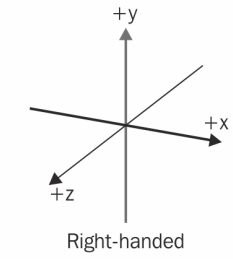
(Image: Wikipedia)
3D Content Resources are painted into Scenes. This can include 3D models, which can be painted into Scenes as Annotations with [motivation][prezi-40-model-motivation] "painting". Due to particular considerations of 3D space and rendering content within that space, such as scaling or textures with forward and backward faces, non-3D Content Resources must first be wrapped within an appropriate Container or Resource before being painted into a Scene. Image and video resources should be painted on to a Canvas, where the Canvas can in turn be painted into a Scene. Audio resources or Timelines should be referenced by an AudioEmitter and the AudioEmitter can be painted into a Scene. For further detail about painting Containers within other Containers, see Nesting.
Constructs from the domain of 3D graphics are expressed in IIIF as Resources. They are associated with Scenes via Painting Annotations in the same manner as Content Resources. They aid in or enhance the rendering of Content Resources, especially in Scenes.
A Camera provides a view of a region of the Scene's space from a particular position within the Scene; the client constructs a viewport into the Scene and uses the view of one or more Cameras to render that region. The size and aspect ratio of the viewport is client and device dependent.
There are two types of Camera, [PerspectiveCamera][prezi-40-model-PerspectiveCamera] and [OrthographicCamera][prezi-40-model-OrthographicCamera]. The first Camera defined and not hidden in a Scene is the default Camera used to display Scene contents. If the Scene does not have any Cameras defined within it, then the client provides a default Camera. The type, properties and position of this default camera are client-dependent.
There are four types of Light: AmbientLight, DirectionalLight, PointLight and SpotLight. They have a [color][prezi-40-model-color] and an [intensity][prezi-40-model-intensity]. SpotLight has an additional property of [angle][prezi-40-model-angle] that determines the spread of its light cone.
If the Scene has no Lights, then the client provides its own lighting as it sees fit.
There are three types of Audio emitter: AmbientAudio, PointAudio and SpotAudio. They have a [source][prezi-40-model-source] (an audio Content Resource) and a [volume][prezi-40-model-volume].
When painting resources into Scenes, it is often necessary to resize, rotate or move them relative to the coordinate space of the Scene. These operations are specified using three Transforms: ScaleTransform, RotateTransform and TranslateTransform. Each Transform has three properties, [x][prezi-40-model-x], [y][prezi-40-model-y] and [z][prezi-40-model-z] which determine how the Transform affects that axis in the local coordinate space.
Transforms are added to a SpecificResource using the [transform][prezi-40-model-transform] property, and there may be more than one applied when adding a model to a Scene. Different orders of the same set of transforms can have different results, so attention must be paid when creating the array and when processing it.
This example is a Manifest with a single Scene, with a single model of a space suit painted at the Scene's origin.
PNG of Scene
{
"@context": "http://iiif.io/api/presentation/4/context.json",
"id": "https://example.org/iiif/3d/model_origin.json",
"type": "Manifest",
"label": { "en": ["Single Model"] },
"summary": { "en": ["Viewer should render the model at the scene origin, and then viewer should add default lighting and camera"] },
"items": [
{
"id": "https://example.org/iiif/scene1/page/p1/1",
"type": "Scene",
"label": { "en": ["A Scene"] },
"items": [
{
"id": "https://example.org/iiif/scene1/page/p1/1",
"type": "AnnotationPage",
"items": [
{
"id": "https://example.org/iiif/3d/anno1",
"type": "Annotation",
"motivation": ["painting"],
"body": {
"id": "https://raw.githubusercontent.com/IIIF/3d/main/assets/astronaut/astronaut.glb",
"type": "Model",
"format": "model/gltf-binary"
},
"target": "https://example.org/iiif/scene1/page/p1/1"
}
]
}
]
}
]
}Key Points
- As this Scene only has one resource in it (the model), the client must provide lighting and a default camera.
- In this simplest use case, the Painting Annotation targets the whole Scene rather than a specific point. The client places the model's origin at the Scene's origin. This is in contrast to the bounded Containers [
Canvas][prezi-40-model-Canvas] and [Timeline][prezi-40-model-Timeline], where the painted resource fills the Container completely. {: .note}
This example adds a Light and a Camera to the previous example, and places the model at a specific point rather than at the default origin position.
Annotations may use a type of Selector called a [PointSelector][prezi-40-model-PointSelector] to align the Annotation to a point within the Scene that is not the Scene's origin. PointSelectors have three spatial properties, [x][prezi-40-model-x], [y][prezi-40-model-y] and [z][prezi-40-model-z] which give the value on that axis. They also have a temporal property [instant][prezi-40-model-instant] which can be used if the Scene has a duration, which gives the temporal point in seconds from the start of the duration, the use of which is defined in the section on Scenes with Durations.
The Light is green and has a position, but has its default orientation of looking along the negative-y axis as no rotation has been specified. The Camera has a position and is pointing at the model's origin via the [lookAt][prezi-40-model-lookAt] property. The Camera has a [fieldOfView][prezi-40-model-fieldOfView] of 50. The [near][prezi-40-model-near] and [far][prezi-40-model-far] properties are included to ensure the model falls within the camera's range (although unnecessary in a simple Scene like this). The Scene has a background color.

{
"@context": "http://iiif.io/api/presentation/4/context.json",
"id": "https://example.org/iiif/3d/model_origin.json",
"type": "Manifest",
"label": { "en": ["Single Model with light and Camera"] },
"summary": { "en": ["Viewer should render the model at (-1,0,1), add the light, and base the viewport on the provided camera"] },
"items": [
{
"id": "https://example.org/iiif/scene1/page/p1/1",
"type": "Scene",
"label": { "en": ["A Scene"] },
"backgroundColor": "#FF00FE",
"items": [
{
"id": "https://example.org/iiif/scene1/page/p1/1",
"type": "AnnotationPage",
"items": [
{
"id": "https://example.org/iiif/3d/anno1",
"type": "Annotation",
"motivation": ["painting"],
"body": {
"id": "https://raw.githubusercontent.com/IIIF/3d/main/assets/astronaut/astronaut.glb",
"type": "Model",
"format": "model/gltf-binary"
},
"target": {
"type": "SpecificResource",
"source":
{
"id": "https://example.org/iiif/scene1/page/p1/1",
"type": "Scene"
},
"selector": [
{
"type": "PointSelector",
"x": -1.0,
"y": 1.0,
"z": 1.0
}
]
}
},
{
"id": "https://example.org/iiif/3d/anno2",
"type": "Annotation",
"motivation": ["painting"],
"body": [
{
"id": "https://example.org/iiif/3d/cameras/1",
"type": "PerspectiveCamera",
"label": {"en": ["Perspective Camera 1"]},
"lookAt": {
"id": "https://example.org/iiif/3d/anno1",
"type": "Annotation"
},
"near": 1,
"far": 100,
"fieldOfView": 50
}
],
"target": [
{
"type": "SpecificResource",
"source":
{
"id": "https://example.org/iiif/scene1/page/p1/1",
"type": "Scene"
},
"selector": [
{
"type": "PointSelector",
"x": 0.0,
"y": 6.0,
"z": 10.0
}
]
}
]
},
{
"id": "https://example.org/iiif/3d/anno2",
"type": "Annotation",
"motivation": ["painting"],
"body": [{
"id": "https://example.org/iiif/3d/lights/1",
"type": "SpotLight",
"label": {"en": ["Spot Light 1"]},
"angle": 90.0,
"color": "#A0FFA0"
}],
"target": [{
"type": "SpecificResource",
"source": {
"id": "https://example.org/iiif/scene1/page/p1/1",
"type": "Scene"
},
"selector": [
{
"type": "PointSelector",
"x": 0.0,
"y": 3.0,
"z": 1.0
}
]
}]
}
]
}
]
}
]
}Key Points
- This example uses some of the Scene-Specific resources introduced in the next section.
- A Point Selector explicitly places the model in the Scene via the Painting Annotation's [
target][prezi-40-model-target] property. In the previous example, there was an implicit Point Selector placing the model at (0,0,0) because no explicit Point Selector was provided. - The provided Light should replace any default lighting the client might have. {: .note}
Definitions
Classes: [Manifest][prezi-40-model-Manifest], [Scene][prezi-40-model-Scene], Model, [SpecificResource][prezi-40-model-SpecificResource], [PointSelector][prezi-40-model-PointSelector], [PerspectiveCamera][prezi-40-model-PerspectiveCamera], [SpotLight][prezi-40-model-SpotLight]
Properties: [backgroundColor][prezi-40-model-backgroundColor], [lookAt][prezi-40-model-lookAt], [near][prezi-40-model-near], [far][prezi-40-model-far], [feildOfView][prezi-40-model-fieldOfView], [angle][prezi-40-model-angle], [color][prezi-40-model-color]
{: .note}
This example is a Manifest with a single Scene with multiple models painted into the Scene at specific positions with transforms applied. It represents a collection of chess game pieces with multiple pawns and a single queen. The example demonstrates painting multiple models into a Scene, including one Content Resource being painted into a Scene multiple times. Transforms and Point Selectors are used to establish position and scale for Annotations. Some external web resources referenced as Content Resources may include elements such as lights or audio that are undesirable within a Manifest, and the [exclude][prezi-40-model-exclude] property is used to prevent these from being rendered. The property [interactionMode][prezi-40-model-interactionMode] is used to guide clients in how to best guide or limit user interaction with rendered content.
{
"@context": "http://iiif.io/api/presentation/4/context.json",
"id": "https://example.org/iiif/3d/model_origin.json",
"type": "Manifest",
"label": { "en": ["Use Case 6: Complex Scene"] },
"items": [
{
"id": "https://example.org/iiif/scene1/page/p1/1",
"type": "Scene",
"label": { "en": ["Chess Game Pieces"] },
"interactionMode": ["hemisphere-orbit"],
"items": [
{
"id": "https://example.org/iiif/scene1/page/p1/1",
"type": "AnnotationPage",
"items": [
{
"id": "https://example.org/iiif/3d/anno1",
"type": "Annotation",
"motivation": ["painting"],
"body": [{
"id": "https://raw.githubusercontent.com/IIIF/3d/main/assets/chess/pawn.glb",
"label": {"en": ["Pawn 1"]},
"type": "Model",
"format": "model/gltf-binary"
}],
"target": [{
"type": "SpecificResource",
"source": {
"id": "https://example.org/iiif/scene1/page/p1/1",
"type": "Scene"
},
"selector": [
{
"type": "PointSelector",
"x": 1.0,
"y": 0.0,
"z": 0.0
}
]
}]
},
{
"id": "https://example.org/iiif/3d/anno1",
"type": "Annotation",
"motivation": ["painting"],
"body": [{
"type": "SpecificResource",
"source":
{
"id": "https://raw.githubusercontent.com/IIIF/3d/main/assets/chess/pawn.glb",
"label": {"en": ["Pawn 2 tipped over"]},
"type": "Model",
"format": "model/gltf-binary"
},
"transform": [
{
"type": "RotateTransform",
"x": 0.0,
"y": 0.0,
"z": -90.0
},
{
"type": "TranslateTransform",
"x": 0.0,
"y": 1.0,
"z": 0.0
}
]
}],
"target": [{
"type": "SpecificResource",
"source": {
"id": "https://example.org/iiif/scene1/page/p1/1",
"type": "Scene"
},
"selector": [
{
"type": "PointSelector",
"x": 2.0,
"y": 0.0,
"z": 3.0
}
]
}]
},
{
"id": "https://example.org/iiif/3d/anno1",
"type": "Annotation",
"motivation": ["painting"],
"exclude": ["Audio", "Lights"],
"body": [{
"type": "SpecificResource",
"source":
{
"id": "https://raw.githubusercontent.com/IIIF/3d/main/assets/chess/queen.glb",
"label": {"en": ["Queen"]},
"type": "Model",
"format": "model/gltf-binary"
},
"transform": [
{
"type": "ScaleTransform",
"x": 1.5,
"y": 1.5,
"z": 1.5
},
]
}],
"target": [{
"type": "SpecificResource",
"source": {
"id": "https://example.org/iiif/scene1/page/p1/1",
"type": "Scene"
},
"selector": [
{
"type": "PointSelector",
"x": 1.0,
"y": 0.0,
"z": 2.0
}
]
}
]
}
]
}
]
}
]
}Key Points
- Each Annotation is painted into the Scene at a different point via Point Selectors.
- The second Annotation represents a pawn game piece that is tipped over, and Transforms are used to achieve this. RotateTransform is used to tip the pawn over and TranslateTransform is used to align the bottom of the pawn with the coordinate origin's XY plane.
- The third Annotation represents a queen game piece that is scaled to be larger than the pawns using ScaleTransform.
- The [
exclude][prezi-40-model-exclude] property instructs clients not to import or render any external audio or light content present in the Content Resource for the queen game piece. - The [
interactionMode][prezi-40-model-interactionMode] property instructs clients that, if possible, user interactions relating to orbiting the scene should be restricted to a hemisphere. {: .note}
Definitions
Classes: [Manifest][prezi-40-model-Manifest], [Scene][prezi-40-model-Scene], Model, [SpecificResource][prezi-40-model-SpecificResource], [PointSelector][prezi-40-model-PointSelector], [RotateTransform][prezi-40-model-RotateTransform], [TranslateTransform][prezi-40-model-TranslateTransform], [ScaleTransform][prezi-40-model-ScaleTransform]
Properties: [exclude][prezi-40-model-exclude], [interactionMode][prezi-40-model-interactionMode]
{: .note}
This example is a Manifest with a single Scene with a duration. Multiple Audio Emitter Annotations are painted into the Scene, with positional emitters used to create a 3D audio experience. Some of the Audio Emitter Annotations are only painted into the Scene for a limited period of time, producing dynamic change in the sounds heard within the Scene. A commenting Annotation is also provided to highlight the instant in time when a change in sound occurs.
A content resource may be annotated into a Scene for a period of time by use of a PointSelector that is temporally scoped by a FragmentSelector. The FragmentSelector has a value property, the value of which follows the media fragment syntax of t=. This annotation pattern uses the [refinedBy][prezi-40-model-refinedBy] property defined by the W3C Web Annotation Data Model. When using a URL fragment in place of a SpecificResource, the parameter t can be used to select the temporal region. Both patterns are used in this example.
An Annotation may target a specific point in time using a PointSelector's [instant][prezi-40-model-instant] property. The property's value must be a positive floating point number indicating a value in seconds that falls within the Scene's duration. In this example this is used for a comment Annotation.
In this example, the audio content resources have durations that do not match the Scene's duration. The Annotation property timeMode property is used to indicate the desired behavior when the duration of the content resource that is not equal to the temporal region targeted by the annotation.
{
"@context": "http://iiif.io/api/presentation/4/context.json",
"id": "https://example.org/iiif/3d/model_origin.json",
"type": "Manifest",
"label": { "en": ["Use Case 7: Scene with Audio"] },
"items": [
{
"id": "https://example.org/iiif/scene1/page/p1/1",
"type": "Scene",
"label": { "en": ["Positional Audio Symphony Hall Experience"] },
"duration": 60,
"items": [
{
"id": "https://example.org/iiif/3d/anno1",
"type": "Annotation",
"motivation": ["painting"],
"body": [{
"id": "https://example.org/iiif/audio/1",
"type": "AmbientAudio",
"source": {
"id": "https://example.org/iiif/assets/symphony_hall_ambience.mp3",
"type": "Audio",
"format": "audio/mp3"
},
"volume": {
"id": "https://example.org/iiif/quantity/1",
"type": "Quantity",
"unit": "relative",
"quantityValue": 0.1
}
}],
"target": [
{
"id": "https://example.org/iiif/scene1",
"type": "Scene"
}
]
},
{
"id": "https://example.org/iiif/3d/anno2",
"type": "Annotation",
"motivation": ["painting"],
"timeMode": "trim",
"body": [{
"id": "https://example.org/iiif/audio/2",
"type": "PointAudio",
"source": {
"id": "https://example.org/iiif/assets/orchestra_percussion_120s.mp3",
"type": "Audio",
"format": "audio/mp3",
"duration": 120.0
},
"volume": {
"id": "https://example.org/iiif/quantity/2",
"type": "Quantity",
"unit": "relative",
"quantityValue": 0.2
}
}],
"target": [{
"id": "https://example.org/iiif/selectors/anno2",
"type": "SpecificResource",
"source":
{
"id": "https://example.org/iiif/scene1",
"type": "Scene"
},
"selector": [
{
"id": "https://example.org/uuid/9fbd580b-895b-41b9-974a-1553329037f2",
"type": "PointSelector",
"x": -3.0,
"y": 0.0,
"z": -2.0,
"refinedBy": {
"id": "https://example.org/uuid/3d0d097b-2b37-4a15-b6a5-506e417d5115",
"type": "FragmentSelector",
"value": "t=0,30"
}
}
]
}]
},
{
"id": "https://example.org/iiif/3d/anno3",
"type": "Annotation",
"motivation": ["painting"],
"timeMode": "loop",
"body": [{
"id": "https://example.org/iiif/audio/3",
"type": "SpotAudio",
"source": {
"id": "https://example.org/iiif/assets/orchestra_tuba_10s.mp3",
"type": "Audio",
"format": "audio/mp3",
"duration": 10.0
},
"angle": 45.0,
"volume": {
"id": "https://example.org/iiif/quantity/3",
"type": "Quantity",
"unit": "relative",
"quantityValue": 0.3
},
"lookAt": "https://example.org/iiif/scene1"
}],
"target": [
{
"id": "https://example.org/iiif/scene1#xyz=3,0,-2&t=30,60",
"type": "Scene"
}
]
}
],
"annotations": [
{
"id": "https://example.org/iiif/3d/commenting",
"type": "Annotation",
"motivation": ["commenting"],
"body": [
{
"type": "TextualBody",
"value": "This is the point when the percussion stops playing and the tuba begins playing."
}
],
"target": [{
"type": "SpecificResource",
"source":
{
"id": "https://example.org/iiif/scene1",
"type": "Scene"
}
,
"selector": [
{
"type": "PointSelector",
"instant": 30.0
}
]
}]
}
]
}
]
}Key Points
- The Scene has a duration of 60 seconds.
- The Scene has three different Audio Emitter Annotations painted into the Scene---AmbientAudio, PointAudio, and SpotAudio. Each Audio Emitter uses the [
volume][prezi-40-model-volume] property to specify audio volume. - AmbientAudio targets the Scene via a reference to the Scene URI, which implicitly targets the Scene's entire duration.
- PointAudio targets the Scene with a PointSelector to paint the Audio Emitter at a specific point in 3D space, and that PointSelector is temporally scoped by a FragmentSelector to target the first 30 seconds of the Scene duration.
- SpotAudio targets the Scene via a URL fragment to demonstrate an alternate approach to target a point and range of time in the Scene. It uses the [
lookAt][prezi-40-model-lookAt] property to point the Audio Emitter cone toward the Scene origin. - The content resources for PointAudio and SpotAudio use the property [
timeMode][prezi-40-model-timeMode] to specify different ways of handling mismatches between content resource audio length and Scene duration. - A commenting Annotation targets the Scene at the instant corresponding to 30 seconds of the Scene duration to highlight the point at which PointAudio stops playing and SpotAudio begins playing.
- It is an error to select a temporal region of a Scene that does not have a [
duration][prezi-40-model-duration], or to select a temporal region that is not within the Scene's temporal extent. A Canvas or Scene with a [duration][prezi-40-model-duration] may not be annotated as a content resource into a Scene that does not itself have a [duration][prezi-40-model-duration]. {: .note}
Definitions
Classes: [Manifest][prezi-40-model-Manifest], [Scene][prezi-40-model-Scene], [SpecificResource][prezi-40-model-SpecificResource], [PointSelector][prezi-40-model-PointSelector], [FragmentSelector][prezi-40-model-FragmentSelector], [AmbientAudio][prezi-40-model-AmbientAudio], [PointAudio][prezi-40-model-PointAudio], [SpotAudio][prezi-40-model-SpotAudio]
Properties: [duration][prezi-40-model-duration], [volume][prezi-40-model-volume], [angle][prezi-40-model-angle], [lookAt][prezi-40-model-lookAt], [timeMode][prezi-40-model-timeMode]
{: .note}
How does this relate to model doc? What's normative and needs to be in model.md because it defines a Scene?
A Container can be painted into another Container as an Annotation with [motivation][prezi-40-model-motivation] "painting". For example, a Timeline may be painted into a Canvas, a Canvas may be painted into another Canvas, a Canvas may be painted into a Scene, and a Scene may be painted into another Scene. Multiple Containers may be hierarchically nested within each other, and so the list of examples above could be implemented as a single nesting sequence of five Containers.
A Timeline, Canvas, or Scene with [duration][prezi-40-model-duration] can only be painted into a Container that also has [duration][prezi-40-model-duration]. It is possible to associate a Container with [duration][prezi-40-model-duration] with a Container that does not have [duration][prezi-40-model-duration] as the content of a commenting annotation rather than painting it into the Container. If a Container with [duration][prezi-40-model-duration] has a shorter or longer [duration][prezi-40-model-duration] than the Container into which it is to be painted, the [timeMode][prezi-40-model-timeMode] property can be used to instruct clients how to resolve the mismatch.
{
"id": "https://example.org/iiif/presentation/examples/nesting/anno1",
"type": "Annotation",
"motivation": ["painting"],
"timeMode": "loop",
"body": [
{
"id": "https://example.org/iiif/presentation/examples/nesting/timeline/t1",
"type": "Timeline",
"label": { "en": [ "Side A: 99 Luftballons" ] },
"duration": 231
}
],
"target": "https://example.org/iiif/presentation/examples/nesting/canvas-10minute-duration"
}Painting nested content into a Scene has some special requirements that must be observed due to important distinctions relating to the infinite boundless 3D space described by a Scene. 2D image or video content resources can be painted into a Scene by first painting the image or video content resource on a Canvas and then painting the Canvas into the Scene. In the case of painting a Timeline into a Scene, an Audio Emitter can be painted into the scene where Timeline is the [body][prezi-40-model-body] of the Audio Emitter. This provides greater control over the intended presentation of the Timeline's audio content within the 3D space of the Scene.
A Canvas can be painted into a Scene as an Annotation, though differences between the 2D space described by a Canvas and the 3D space described by a Scene must be considered. A Canvas describes a bounded 2D space with finite [height][prezi-40-model-height] and [width][prezi-40-model-width] measured in 2D integer coordinates with a coordinate origin at the top-left corner of the Canvas, while Scenes describe a boundless 3D space with x, y, and z axes of 3D continuous coordinates and a coordinate origin at the center of the space. Further, although 2D images or videos with pixel height and width can be painted into a Canvas, Canvas 2D coordinates are not equivalent to pixels. An image of any height and width in pixels can be painted into a Canvas with different height and weight in coordinate units, and this has important consequences for painting Canvases into Scenes.
When a Canvas is painted as an Annotation targeting a Scene, the top-left corner of the Canvas (the 2D coordinate origin) is aligned with the 3D coordinate origin of the Scene. The top edge of the Canvas is aligned with (e.g., is colinear to) the positive x axis extending from the coordinate origin. The left edge of the Canvas is aligned with (e.g., is colinear to) the negative y axis extending from the coordinate origin. The direction terms "top", "bottom", "right", and "left" used in this section refer to the frame of reference of the Canvas itself, not the Scene into which the Canvas is painted.
The Canvas is scaled to the Scene such that the 2D coordinate dimensions correspond to 3D coordinate units - a Canvas 16 units wide and 9 units high will extend 16 coordinate units across the x axis and 9 coordinate units across the y axis. Because Canvas coordinate units and image content resource pixels are not equivalent, any image with a 16:9 aspect ratio painted on this Canvas would extend 16 coordinate units by 9 coordinate units in the 3D space of the Scene, whether it was 160 pixels wide and 90 pixels high or 16,000 pixels wide and 9,000 pixels high. This provides one way to control the size of a Canvas painted into a Scene.
A Canvas in a Scene has a specific forward face and a backward face. By default, the forward face of a Canvas should point in the direction of the positive z axis. If the property [backgroundColor][prezi-40-model-backgroundColor] is used, this color should be used for the backward face of the Canvas. Otherwise, a reverse view of the forward face of the Canvas should be visible on the backward face.
A [PointSelector][prezi-40-model-PointSelector] can be used to modify the point at which the Canvas will be painted, by establishing a new point to align with the top-left corner of the Canvas instead of the Scene coordinate origin. Transforms can be used to modify Canvas rotation, scale, or translation, allowing in particular for an alternate method to control the size of a Canvas to be scaled appropriately to other contents within a Scene. The forward face and backward face of a Canvas can be interchanged with a Scale Transform scaling the z axis by -1.0, though this reflection will also produce mirroring.
{
"id": "https://example.org/iiif/presentation/examples/nesting/anno2",
"type": "Annotation",
"motivation": ["painting"],
"body": [{
"type": "SpecificResource",
"source":
{
"id": "https://example.org/iiif/presentation/examples/nesting/canvas/c1",
"type": "Canvas",
"width": 2,
"height": 2,
"items": [ { ... } ]
},
"transform": [
{
"type": "ScaleTransform",
"x": 2.0,
"y": 2.0,
"z": -1.0
}
]
}],
"target": [{
"type": "SpecificResource",
"source": {
"id": "https://example.org/iiif/presentation/examples/nesting/scene/s1",
"type": "Scene"
},
"selector": [
{
"type": "PointSelector",
"x": 4.0,
"y": 4.0,
"z": 0.0
}
]
}]
}Key Points
- The 2D Canvas painted into the Scene has an initial height and width of 2 units by 2 units. Absent any transform or the use of a PointSelector, this Canvas would by default face toward the Scene's positive z axis, would stretch 2 units across the x axis and 2 units across the y axis, and its top-left corner would align with the coordinate origin of the Scene. Instead, transforms and a PointSelector will modify this placement significantly.
- A ScaleTransform is used to double the Canvas height and width, so that after transformation the Canvas will extend 4 coordinate units across the Scene x axis and 4 coordinate units across the Scene y axis.
- The same ScaleTransform also reflects the z axis by scaling it by -1.0, meaning the Canvas is mirrored (flipped) and now faces toward the negative z axis.
- A PointSelector is used to align the top-left corner of the transformed Canvas with Scene coordinate (4,4,0). In combination with the ScaleTransform, the bottom-right corner of the Canvas is now aligned with the coordinate origin of the Scene. {: .note}
Like Timelines or Canvases, Scenes can be painted into Scenes. As with other resources, it may be appropriate to modify the initial scale, rotation, or translation of a content resource Scene prior to painting it within another Scene. Scenes associated with SpecificResources may be manipulated through Transforms.
When a Scene is nested into another Scene, the [backgroundColor][prezi-40-model-backgroundColor] of the Scene to be nested should be ignored as it is non-sensible to import. All Annotations painted into the Scene to be nested will be painted into the Scene into which content is being nested, including Light or Camera resources. If the Scene to be nested has one or more Camera Annotations while the Scene into which content is being nested does not, the first Camera Annotation from the nested Scene will become the default Camera for the overall Scene.
{
"id": "https://example.org/iiif/presentation/examples/nesting/anno3",
"type": "Annotation",
"motivation": ["painting"],
"body": {
"id": "https://example.org/iiif/presentation/examples/nesting/scene/s1",
"type": "Scene"
},
"target": "https://example.org/iiif/presentation/examples/nesting/scene/s2"
}In the examples so far, Annotations have been used to associate the images, audio and other Content Resources with their Containers for presentation. IIIF uses the same W3C standard for the perhaps more familiar annotation concepts of commenting, tagging, describing and so on. Annotations can carry textual transcriptions or translations of the content, discussion about the content and any other linking between resources.
Whereas annotations that associate content resources with Containers are included in the [items][prezi-40-model-items] property of the Container, all other types of Annotation are referenced from the [annotations][prezi-40-model-annotations] property. Containers, Manifests, Collections and Ranges can all have this property, linking to relevant annotations. As with the [items][prezi-40-model-items] property, annotations are grouped into one or more AnnotationPage resources. These are usually external references.
Manifest
items
Canvas
annotations
AnnotationPage
items
Annotation
Annotation Pages are used to group Annotations. In cases where many annotations are present, such as when transcription, translation, and commentary are associated with a manuscript, it can be useful to separate these annotations into groups that can facilitate improved user interactions in a client.
Each Annotation Page can be embedded or externally referenced. Clients should process the Annotation Pages and their items in the order given in the Container. Publishers may choose to expedite the processing of embedded Annotation Pages by ordering them before external pages, which will need to be dereferenced by the client. Order can be significant, however. Annotations are assigned an ascending z-index from the first annotation encountered. Annotations with a higher z-index will render in front of those with a lower z-index when displayed on a Canvas.
Annotation Collections represent groupings of Annotation Pages that should be managed as a single whole, regardless of which Container or resource they target. This allows, for example, all of the Annotations that make up a particular translation of the text of a book to be collected together. A client might then present a user interface that allows all of the Annotations in an Annotation Collection to be displayed or hidden according to the user’s preference.
For Annotation Collections with many Annotations, there will be many pages. The Annotation Collection refers to the first and last page, and then the pages refer to the previous and next pages in the ordered list. Each page is part of the Annotation Collection.
{
"id": "https://example.org/iiif/book1/annocoll/transcription",
"type": "AnnotationCollection",
"label": {"en": ["Diplomatic Transcription"]},
"total": 112,
"first": { "id": "https://example.org/iiif/book1/annopage/l1", "type": "AnnotationPage" },
"last": { "id": "https://example.org/iiif/book1/annopage/l112", "type": "AnnotationPage" }
}{
"id": "https://example.org/iiif/book1/annopage/l2",
"type": "AnnotationPage",
"prev": "https://example.org/iiif/book1/annopage/l1",
"next": "https://example.org/iiif/book1/annopage/l3",
"items": [
{
"id": "https://example.org/iiif/book1/annopage/l2/a1",
"type": "Annotation"
// ...
},
{
"id": "https://example.org/iiif/book1/annopage/l2/a2",
"type": "Annotation"
// ...
}
],
"partOf": [
{
"id": "https://example.org/iiif/book1/annocoll/transcription",
"type": "AnnotationCollection",
}
]
}Commentary can be associated with a Timeline, Canvas, or Scene via Annotations with a commenting motivation.
This is an example of a commenting annotation that targets two-minute segment of a muscial performance.
{
"id": "https://example.org/iiif/presentation/examples/commenting/anno/1",
"type": "Annotation",
"motivation": [ "commenting" ],
"body": {
"id": "https://example.org/iiif/presentation/examples/commenting/anno/1/theme2",
"type": "TextualBody",
"language": "en",
"format": "text/plain",
"value": "The second theme of the concerto is introduced."
},
"target": "https://example.org/iiif/presentation/examples/commenting/timeline/t1#t=38.0,158.0"
}A comment on a Canvas can target a non-rectangular area. This example uses a [SvgSelector][prezi-40-model-SvgSelector] to comment on a painting.
{
"id": "https://example.org/iiif/presentation/examples/commenting/anno/2",
"type": "Annotation",
"motivation": [ "commenting" ],
"body": [{
"id": "https://example.org/iiif/presentation/examples/commenting/anno/2/person2",
"type": "TextualBody",
"language": "en",
"format": "text/plain",
"value": "Note the expressive eyes of the subject of this painting."
}],
"target": [{
"type": "SpecificResource",
"source": {
"id": "https://example.org/iiif/presentation/examples/commenting/canvas/2",
"type": "Canvas"
},
"selector": [
{
"id": "https://example.org/iiif/presentation/examples/commenting/anno2/selector2",
"type": "SvgSelector",
"value": "<svg:svg> ... </svg:svg>"
}
]
}]
}Annotations may alternately use a different type of Selector, called a [WktSelector][prezi-40-model-WktSelector], to align the Annotation to a target region within a Canvas or Scene.
A commenting annotation can also reference a Content Resource, such as a Model, within a Scene. This is accomplished by targeting the annotation that paints the resource into the Scene. In this example, the commenting annotation targets an annotation that paints a model of a portrait bust into a scene.
In some cases it is desirable to influence the client's positioning of the commenting annotation when rendered. This may be done to ensure that the annotation does not hide key visual elements or to ensure that the annotation itself is not obscured by resources painted in the Container, such as 3D models. In these cases, the [position][prezi-40-model-position] property may be used to define the position where a TextualBody should be rendered. The example shows a [position][prezi-40-model-position] that places the annotation at a specific coordinate within the Scene. The position is a [SpecificResource][prezi-40-model-SpecificResource] that requires a [source][prezi-40-model-source] and selector.
{
"@context": "http://iiif.io/api/presentation/4/context.json",
"id": "https://example.org/iiif/manifest/commenting/manifest/3",
"type": "Manifest",
"label": { "en": [ "1st Centry Roman portrait bust with comment" ] },
"items": [
{
"id": "https://example.org/iiif/scene/commenting/scene3",
"type": "Scene",
"items": [
{
"id": "https://example.org/iiif/scene/commenting/scene3/painting-annotation-pages/1",
"type": "AnnotationPage",
"items": [
{
"id": "https://example.org/iiif/scene/commenting/scene3/sculpture",
"type": "Annotation",
"motivation": [ "painting"] ,
"label": {
"en": [ "A 1st century Roman portait bust." ]
},
"body": {
"id": "https://example.org/iiif/scene/commenting/models/portait.gltf",
"type": "Model"
},
"target": "https://example.org/iiif/scene/commenting/scene3"
}
]
}
]
}
],
"annotations": [
{
"id": "https://example.org/iiif/scene/commenting/scene3/commenting-annotation-pages/1",
"type": "AnnotationPage",
"items": [
{
"id": "https://example.org/iiif/presentation/examples/commenting/anno/3",
"type": "Annotation",
"motivation": [ "commenting" ],
"body": {
"id": "https://example.org/iiif/presentation/examples/commenting/anno/3/comment1",
"type": "TextualBody",
"language": "en",
"format": "text/plain",
"value": "This marble portrait exemplifies the veristic tradition that dominated Roman Republican portraiture and persisted into the early Imperial period.",
"position": {
"type": "SpecificResource",
"source": [
{
"id": "https://example.org/iiif/scene/commenting/scene3",
"type": "Scene"
}
],
"selector": [
{
"type": "PointSelector",
"x": 0.75,
"y": 1.5,
"z": 0.1
}
]
}
},
"target": "https://example.org/iiif/scene/commenting/scene3/sculpture"
}
]
}
]
}An Annotation with the motivation linking is used to create links between resources, both within the Manifest or to external content on the web, including other IIIF resources. Examples include linking to the continuation of an article in a digitized newspaper in a different Canvas, or to an external web page that describes the diagram in the Canvas. A client typically renders the links as clickable "Hotspots" - but can offer whatever accessible affordance as appropriate. The user experience of whether the linked resource is opened in a new tab, new window or by replacing the current view is up to the implementation.
The resource the user should be taken to is the [body][prezi-40-model-body] of the annotation, and the region of the Container that the user clicks or otherwise activates to follow the link is the [target][prezi-40-model-target]:
{
"id": "https://example.com/annotation/p0002-link",
"type": "Annotation",
"motivation": "linking",
"body": [
{
"id": "https://example.com/website1",
"type": "Text"
}
],
"target": "https://example.com/canvas/p1#xywh=265,661,1260,1239"
}Sometimes it is necessary to modify the state of resources. Annotations with the motivation activating are referred to as activating annotations, and are used to change resources from their initial state defined in the Manifest or from their current state. They allow IIIF to be used for interactive exhibitions, storytelling, digital dioramas and other interactive applications beyond simply conveying a set of static resources in a Container.
The [target][prezi-40-model-target] of the activating annotation is the resource that triggers an action. This could be a commenting annotation, for which a user might click a corresponding UI element. In other scenarios the [target][prezi-40-model-target] could be the painting annotation of a 3D model, or an annotation that targets part of a model, or a region of a Canvas, or a point or segment of a Timeline, or any other annotation that a user could interact with (in whatever manner) to trigger an event. Even a volume of space in a Scene or an extent of time in a Container with [duration][prezi-40-model-duration] could be the [target][prezi-40-model-target]. When that volume or time extent is triggered - which might be the user entering that volume or the playhead reaching the extent independently of user interaction - something happens.
This specification does not define how a client indicates to a user that a resource is able to be interacted with.
The body of the activating annotation is always an ordered list of Specific Resources, each with [source][prezi-40-model-source] and [action][prezi-40-model-action] properties. The [source][prezi-40-model-source] is the resource to be acted upon in some way, and the [action][prezi-40-model-action] property is an ordered list of named actions to perform on that resource. Valid values include "show", "hide", "enable", "disable", "start", "stop", "reset" and "select".
Activating annotations are provided in a Container's [annotations][prezi-40-model-annotations] property. They can be mixed in with the commenting (or other interactive annotations) they target, or they can be in a separate Annotation Page. The client should evaluate all of the enabled activating annotations it can find.
A resource with the [behavior][prezi-40-model-behavior] value "hidden" is not rendered by the client. A resource with the [behavior][prezi-40-model-behavior] value "disabled" is not available for user interaction and does not trigger any actions. The following example is a light switch that can be toggled on and off using activating annotations that result in these behaviors being applied or removed. It demonstrates a painted resource - a light - being shown and hidden, and activating annotations being enabled and disabled. Both of these are done by the client processing the action properties of the activating annotation bodies: the actions "show" and "hide" remove or add the behavior value "hidden", and the actions "enable" and "disable" modify the behavior value "disabled".
{
"@context": "http://iiif.io/api/presentation/4/context.json",
"id": "https://example.org/iiif/manifest/switch",
"type": "Manifest",
"label": { "en": [ "Light switch" ] },
"items": [
{
"id": "https://example.org/iiif/scene/switch/scene-1",
"type": "Scene",
"items": [
{
"id": "https://example.org/iiif/scene/switch/scene-1/painting-annotation-pages/1",
"type": "AnnotationPage",
"items": [
{
"id": "https://example.org/iiif/painting-annotation/lightswitch-1",
"type": "Annotation",
"motivation": ["painting"],
"label": {
"en": ["A light switch"]
},
"body": {
"id": "https://example.org/iiif/model/models/lightswitch.gltf",
"type": "Model"
},
"target": "https://example.org/iiif/scene/switch/scene-1"
},
{
"id": "https://example.org/iiif/scene/switch/scene-1/lights/point-light-4",
"type": "Annotation",
"motivation": ["painting"],
"body": {
"id": "https://example.org/iiif/scene/switch/scene-1/lights/4/body",
"type": "PointLight"
},
"target": {
"type": "SpecificResource",
"source": "https://example.org/iiif/scene/switch/scene-1",
"selector": [
{
"type": "PointSelector",
"x": 5, "y": 5, "z": 5
}
]
},
"behavior": ["hidden"]
}
]
}
],
"annotations": [
{
"id": "https://example.org/iiif/scene/switch/scene-1/annos/1",
"type": "AnnotationPage",
"items": [
{
"id": "https://example.org/iiif/scene/switch/scene-1/annos/1/switch-comment-0",
"type": "Annotation",
"motivation": [
"commenting"
],
"body": {
"type": "TextualBody",
"value": "Click the switch to turn the light on or off"
},
"target": "https://example.org/iiif/painting-annotation/lightswitch-1"
},
{
"id": "https://example.org/iiif/scene/switch/scene-1/annos/1/activating-on-2",
"type": "Annotation",
"motivation": [
"activating"
],
"target": "https://example.org/iiif/painting-annotation/lightswitch-1",
"body": [
{
"type": "SpecificResource",
"source": "https://example.org/iiif/scene/switch/scene-1/annos/1/activating-on-2",
"action": ["disable"]
},
{
"type": "SpecificResource",
"source": "https://example.org/iiif/scene/switch/scene-1/annos/1/activating-off-3",
"action": ["enable"]
},
{
"type": "SpecificResource",
"source": "https://example.org/iiif/scene/switch/scene-1/lights/point-light-4",
"action": ["show"]
}
]
},
{
"id": "https://example.org/iiif/scene/switch/scene-1/annos/1/activating-off-3",
"type": "Annotation",
"motivation": [
"activating"
],
"target": "https://example.org/iiif/painting-annotation/lightswitch-1",
"body": [
{
"type": "SpecificResource",
"source": "https://example.org/iiif/scene/switch/scene-1/annos/1/activating-off-3",
"action": ["disable"]
},
{
"type": "SpecificResource",
"source": "https://example.org/iiif/scene/switch/scene-1/lights/point-light-4",
"action": ["hide"]
},
{
"type": "SpecificResource",
"source": "https://example.org/iiif/scene/switch/scene-1/annos/1/activating-on-2",
"action": ["enable"]
}
],
"behavior": ["disabled"]
}
]
}
]
}
]
}- Initially, a model of a light switch is painted into the Scene. A PointLight is also painted, but with the [
behavior][prezi-40-model-behavior] "hidden", which means it is inactive (i.e., off). A commenting annotation with the text "Click the switch to turn the light on or off" targets the light switch. An activating annotation targets the painting annotation that paints the switch, so that user interaction with the light switch will trigger the activating annotation. This activating annotation has a [body][prezi-40-model-body] property with three Specific Resources. The first enables the "off" activating annotation, the second shows the PointLight, and the last disables the activating annotation itself - this activating annotation can no longer be activated by a user interaction with the light switch model (its [target][prezi-40-model-target]). - A further activating annotation has the opposite effect. Initially this has the [
behavior][prezi-40-model-behavior] "disabled" - which means it is inactive. It also targets the painting annotation, but has no effect while disabled. - When the user interacts with the light switch model, the client processes any activating annotations that target it and are enabled. In this case, the first activating annotation is triggered because while both target the switch, only the first is enabled. This activation shows the light (i.e., removes its "hidden" [
behavior][prezi-40-model-behavior] and therefore turning it on) and enables the other activating annotation, and disables itself. - If the user clicks the light again, the client again processes any activating annotations that target it and are not disabled. This time the second activating annotation is the enabled one - and it hides the light (turning it off) and disables itself, and enables the first activating annotation again.
- Subsequent clicks simply alternate between these two states, indefinitely.
Sometimes a model file has inbuilt animations. While a description of these is outside the scope of IIIF, because it is 3D-implementation-specific, as long as there is a way to refer to a model's animation(s) by name, we can connect the animation to IIIF resources.
This pattern is also achieved with activating annotations, except that the body of the activating annotation references a named animation in the model. The [body][prezi-40-model-body] is a Specific Resource, where the [source][prezi-40-model-source] is the Painting Annotation that paints the model, and the selector is of type [AnimationSelector][prezi-40-model-AnimationSelector] with the value being a string that corresponds to the name of the animation in the model.
The format of the value string is implementation-specific, and will depend on how different 3D formats support addressing of animations within models. The same model can be painted multiple times into the scene, and you might want to activate only one painted instance of the model's animation, thus we need to refer to the annotation that paints the model, not the model directly.
{
"id": "https://example.org/iiif/3d/activating-animation.json",
"type": "Manifest",
"label": { "en": ["Music Box with lid that opens as an internal animation"] },
"items": [
{
"id": "https://example.org/iiif/scene1/scene-with-activation-animation",
"type": "Scene",
"label": { "en": ["A Scene Containing a Music Box"] },
"items": [
{
"id": "https://example.org/iiif/scene-with-activation-animation/page/p1/1",
"type": "AnnotationPage",
"items": [
{
"id": "https://example.org/iiif/3d/painting-anno-for-music-box",
"type": "Annotation",
"motivation": ["painting"],
"body": {
"id": "https://raw.githubusercontent.com/IIIF/3d/main/assets/music-box.glb",
"type": "Model"
},
"target": {
// SpecificResource with PointSelector
}
}
],
"annotations": [
{
"id": "https://example.org/iiif/scene1/page/activators",
"type": "AnnotationPage",
"items": [
{
"id": "https://example.org/iiif/3d/box-opening-commenting-anno",
"type": "Annotation",
"motivation": ["commenting"],
"body": [
{
"type": "TextualBody",
"value": "Click me to open the lid"
}
],
"target": [
{
"id": "https://example.org/iiif/3d/painting-anno-for-music-box",
"type": "Annotation"
}
]
}
{
"id": "https://example.org/iiif/3d/box-opening-activating-anno",
"type": "Annotation",
"motivation": ["activating"],
"target": [
{
"id": "https://example.org/iiif/3d/box-opening-commenting-anno",
"type": "Annotation"
}
],
"body": [
{
"type": "SpecificResource",
"source": "https://example.org/iiif/3d/painting-anno-for-music-box",
"selector": [
{
"type": "AnimationSelector",
"value": "open-the-lid"
}
],
"action": ["start"]
}
]
}
]
}
]
}
]
}
]
}It is possible to associate a particular camera with a particular commenting annotation. In many complex 3D Scenes, it may not be clear from where to look at a particular point of interest. The view may be occluded by parts of the model, or other models in the Scene. In the following example, the user can explore the Scene freely, but when they select a particular comment, a specific Camera that was previously hidden (unavailable to the user) is activated, moving the user (i.e., setting the viewport) to a chosen position suitable for looking at the point of interest:
{
"id": "https://example.org/iiif/3d/whale_comment_scope_content_state.json",
"type": "Manifest",
"label": { "en": ["Whale Cranium and Mandible with Dynamic Commenting Annotations and Custom Per-Anno Views"] },
"items": [
{
"id": "https://example.org/iiif/scene1/page/p1/1",
"type": "Scene",
"label": { "en": ["A Scene Containing a Whale Cranium and Mandible"] },
"items": [
{
"id": "https://example.org/iiif/scene1/page/p1/1",
"type": "AnnotationPage",
"items": [
{
"id": "https://example.org/iiif/3d/anno1",
"type": "Annotation",
"motivation": ["painting"],
"body": {
"id": "https://raw.githubusercontent.com/IIIF/3d/main/assets/whale/whale_mandible.glb",
"type": "Model"
},
"target": {
// SpecificResource with PointSelector
}
},
{
"id": "https://example.org/iiif/3d/anno-that-paints-desired-camera-to-view-tooth",
"type": "Annotation",
"motivation": ["painting"],
"behavior": ["hidden"],
"body": [
{
"id": "https://example.org/iiif/3d/cameras/1",
"type": "PerspectiveCamera",
"label": {"en": ["Perspective Camera Pointed At Front of Cranium and Mandible"]},
"fieldOfView": 50.0,
"near": 0.10,
"far": 2000.0
}
],
"target": [
{
"type": "SpecificResource",
"source": [
{
"id": "https://example.org/iiif/scene1",
"type": "Scene"
}
],
"selector": [
{
"type": "PointSelector",
"x": 0.0, "y": 0.15, "z": 0.75
}
]
}
]
},
{
"id": "https://example.org/iiif/3d/anno2",
"type": "Annotation",
"motivation": ["painting"],
"body": {
"id": "https://raw.githubusercontent.com/IIIF/3d/main/assets/whale/whale_cranium.glb",
"type": "Model"
},
"target": {
// SpecificResource with PointSelector
}
}
]
}
]
}
],
"annotations": [
{
"id": "https://example.org/iiif/scene1/page/p1/annotations/1",
"type": "AnnotationPage",
"items": [
{
"id": "https://example.org/iiif/3d/commenting-anno-for-mandibular-tooth",
"type": "Annotation",
"motivation": ["commenting"],
"body": [
{
"type": "TextualBody",
"value": "Mandibular tooth"
}
],
"target": {
// SpecificResource with PointSelector
}
},
{
"id": "https://example.org/iiif/3d/commenting-anno-for-right-pterygoid-hamulus",
"type": "Annotation",
"motivation": ["commenting"],
"body": [
{
"type": "TextualBody",
"value": "Right pterygoid hamulus"
}
],
"target": {
// SpecificResource with PointSelector
}
},
{
"id": "https://example.org/iiif/3d/anno9",
"type": "Annotation",
"motivation": ["activating"],
"target": [
{
"id": "https://example.org/iiif/3d/commenting-anno-for-mandibular-tooth",
"type": "Annotation"
}
],
"body": [
{
"type": "SpecificResource",
"source": "https://example.org/iiif/3d/anno-that-paints-desired-camera-to-view-tooth",
"action": ["show", "enable", "select"]
}
]
}
]
}
]
}The client will render a UI that presents the two commenting annotations in some form and allows the user to navigate between them. An active Camera is not provided (while there is a Camera in the Scene it has [behavior][prezi-40-model-behavior] "hidden", i.e., it is inactive: not usable). The commenting annotations are ordered; while the user might explore them freely in the Scene they might also go "forward" from the first to the second commenting annotation and "back" to the first from the second. In either case the above example instructs the client to activate the Camera when the user interacts with the comment. The user is free to move away but any interaction with that comment will bring them back to the specific viewpoint. (forward ref to chains of activation example)
Default camera:

Camera when annotation selected:

The previous example can also be expressed in a more concise form by providing a reference to the Camera in the scope property of the commenting annotation.
The commenting annotation now looks like this:
{
"id": "https://example.org/iiif/3d/commenting-anno-for-mandibular-tooth",
"type": "Annotation",
"motivation": ["commenting"],
"bodyValue": "Mandibular tooth",
"scope": [
{
"id": "https://example.org/iiif/3d/anno-that-paints-desired-camera-to-view-tooth",
"type": "Annotation"
}
],
"target": {
// SpecificResource with PointSelector
}
},... and the activating annotation is no longer required.
This only works for cameras.
Repeat full example? no, link to external.
Activating annotations add explicit mechanisms for interactive user experiences such as guided viewing and storytelling. A narrative might comprise an Annotation Page of commenting annotations that target different parts of the Container, for example a guided tour of a painting or a map. For a Canvas or Timeline it is usually sufficient to leave the interactivity to the client; the fact that comments target different extents implies the client must offer some affordance for those comments (typically the user can click each one), and in response the client will move the current play point of the Timeline to the commenting annotation target, or pan and zoom the viewport to show the relevant part of an image. For 3D this may not be enough; a particular comment may only make sense from a certain viewpoint (i.e., Camera), or different steps of the story require different Lights to be active.
In a storytelling or exhibition scenario, the non-painting [annotations][prezi-40-model-annotations] might be carrying informative text, or even rich HTML bodies. They can be considered to be steps in the story. The use of activating annotations allows a precise storytelling experience to be specified, including:
- providing a specific viewpoint for each step of the narrative (or even a choice of viewpoints)
- modifying the lighting of the Scene for each step, for example shining a spotlight on a point of interest
- hiding models in the Scene at a particular step
- showing additional models at a particular step
All the annotations referred to by the activating annotations' [target][prezi-40-model-target] and [body][prezi-40-model-body] properties are already present in the Scene from the beginning. Initially, many of them may have the behavior hidden, invisible until activated.
Interactive examples are provided as recipes in the IIIF Cookbook.
While all Annotation Page [items][prezi-40-model-items] are inherently ordered, an Annotation Page with the [behavior][prezi-40-model-behavior] "sequence" is explicitly a narrative, and clients should prevent (dissuade) users from jumping about - the annotations, and the effects of them activating other contents of the Container, are intended to be experienced in order and individually. Normally, a client might display all the comments in an Annotation Page in a sidebar so they are all visible in the UI, but for an Annotation Page with [behavior][prezi-40-model-behavior] "sequence" only show the currently active annotation text, and next and previous UI.
In many cases, the dimensions of a Canvas, or the pixel density of a photograph, are not necessarily related to a real-world size of the object they show. A large wall painting and a tiny miniature may both be conveyed by 20 megapixel source images on a 4000 by 3000 unit Canvas. But it can be important to know how big something is or if there is a relationship between pixel density and physical length, especially when comparing objects together. Each pixel in an image may correspond precisely to a physical area, allowing measurement of real world distances from the image. A scanned 3D model may be constructed such that each 3D coordinate unit corresponds to one meter of physical distance.
The [spatialScale][prezi-40-model-spatialScale] property of a Canvas or Scene provides a corresponding real-world scale for a unit of the Canvas or Scene coordinate system, allowing clients to provide scale information to users, for example by an on-screen virtual ruler. In a 2-up viewer, a client could scale two views to convey the true relative sizes of two objects.
The value of [spatialScale][prezi-40-model-spatialScale] is a UnitValue (ref) that has as a value a length unit. This specification defines only one length unit, "m", i.e., meters, though others may be defined externally as an [extension][prezi30-ldce]. If source size metadata is machine readable (or parse-able) in other measurement systems (e.g., feet and inches) then it should be converted to meters for use in [spatialScale][prezi-40-model-spatialScale]. Publishers may wish to present the original given measure (e.g., from catalogue metadata) in a [metadata][prezi-40-model-metadata] field for context.
The Presentation API also offers a corresponding [temporalScale][prezi-40-model-temporalScale] property for the [duration][prezi-40-model-duration] dimension of a Container, when 1 second in the Container does not correspond to 1 second of real time. This is useful for speeded-up or slowed-down audio or video.
An extreme example of both physical dimension properties together is a Canvas showing an animation of continental drift over the course of Earth history, where the spatialScale could convey that each Canvas unit is several thousand meters, and each second of the Canvas [duration][prezi-40-model-duration] is several million years.
While a IIIF Manifest carries the information required to present a resource on the web, it is unlikely to be the only resource of interest to either human or machine consumers. IIIF provides properties to link to other resources and services. The linked resources might be made directly available to the user by opening links or downloading files in a user interface, or they may be loaded by machines when reading IIIF Manifests to gather further information (for example, to build a search index).
In the following example, the Manifest represents an artwork. The Manifest links to a catalogue record via the seeAlso property, which is intended for machine-readable resources. The homepage property links to the museum's web page about the painting, and is intended for humans. A viewer displays the latter link for the user to click on, but is unlikely to display the former (the user would just see the JSON at the other end).
artwork with seeAlso, rendering, partOf (link to ../c19-french-painting or something)
(maybe the seeAlso is to a linked art description)
There is one Canvas, and it has a rendering property linking to a single high resolution tiff file. This link is for human consumers and would typically be displayed as a download option.
The Manifest also has a partOf property that links to several IIIF Collections that contain a reference to it in their items properties. The partOf property allows a Manifest to assert its place in any hierarchical relationship, such as an archival description, or a volume of a periodical, allowing the user (or machines) to navigate "up" the hierarchy and explore further.
Another common use of rendering is at the Manifest level, to download a single resource that represents the entire Manifest. For example, the Manifest for a 100-page printed book has 100 canvases, which generate a paged user experience in a viewer. The publisher also links to a PDF representation, a plain text representation, and an ePub representation via the rendering property - all representations that a user could download and use offline. Each Canvas could also link to a single text file of the text of that page.
{
"id": "https://example.com/books/1",
"type": "Manifest",
"label": { "en": ["Book1"]},
"items": [ {} ], // Canvases omitted
"rendering": [
{
"id": "https://example.com/books/1.pdf",
"label": { "en": ["PDF of Book1, with hi-res images and searchable and selectable text (large!)"]},
"type": "Text",
"format": "application/pdf",
"fileSize": 132465987
},
{
"id": "https://example.com/books/1.txt",
"label": { "en": ["Plain text of Book1"]},
"type": "Text",
"format": "text/plain",
"fileSize": 46004
},
{
"id": "https://example.com/books/1.epub",
"label": { "en": ["EPub of Book1"]},
"type": "Text",
"format": "application/epub+zip",
"profile": "https://www.w3.org/TR/epub-33/",
"fileSize": 7845277
}
]
}This example also shows how the fileSize property can give useful information to a user when deciding what they want to download.
In many of the examples in this specification an image resource has an associated [IIIF Image API][image-api] Service. This is the most common use of service in IIIF, but other types of service are defined by IIIF specifications or available as extensions. Rather than just offer the link for download, the client is expected to interact with the service on the user's behalf. For the Image API, this usually means generating multiple requests for image tiles at the appropriate zoom level. For the [IIIF Search API][search-api], this means accepting user query terms, sending them to the search service endpoint, and rendering the results for further interaction (typically navigation to the result location within the Manifest).
Further IIIF Services are provided by the IIIF Authorization Flow API, which provides endpoints for a client to learn about a user's current access to a resource, and guide them through the publisher's access control arrangements if they do not have permission, so that they can (if authorised) acquire whatever credentials the publisher requires.
Ad hoc third party services can be developed for specific needs (with no expectation that a general-purpose IIIF client would know what to do with them).
Links to resources and services build up a web of linked content for human and machine consumers to interact with. The IIIF Content State API defines mechanisms for IIIF software implementations to exchange references to this content, including arbitrarily fine-grained pointers into large IIIF resources. A Content State is simply a fragment of the IIIF Presentation API, wrapped in a Content State Annotation, with enough information for software receiving that fragment to load it and (typically) direct the user's attention to the referenced point. A bookmark or citation could be passed between users via save and load functionality in viewers that understand Content State.
(region of a Canvas that is partOf a Manifest)
An image might not be correctly aligned with the Canvas, and require rotation as it is painted. In the following example, the image is painted with a 90-degree rotation. This example uses the ImageApiSelector to convey the number of degrees of the rotation. As this particular image has an image service, the client can use the Image API to request an image that has already been rotated on the server, or it can use the information in the ImageApiSelector to rotate the image itself.
{
"id": "http://example.org/iiif/book1/annotation/anno1",
"type": "Annotation",
"motivation": ["painting"],
"body": [
{
"type": "SpecificResource",
"source": {
"id": "http://example.org/iiif/book1-page1/my-image.jpg",
"type": "Image",
"service": {
"id": "http://example.org/iiif/book1-page1",
"type": "ImageService3",
"profile": "level2"
}
},
"selector": {
"type": "ImageApiSelector",
"rotation": "90"
}
}
],
"target": [
{
"id": "http://example.org/iiif/book1/canvas/p1#xywh=50,50,320,240",
"type": "Canvas"
}
]
}
This section outlines recommendations and requirements related to URIs, HTTP requests, and authentication for IIIF resources.
While any HTTP(S) URI is technically acceptable for any of the resources in the API, there are several best practices for designing the URIs for the resources.
- The URI SHOULD use the HTTPS scheme, not HTTP.
- The URI SHOULD NOT include query parameters or fragments.
- Once published, they SHOULD be as persistent and unchanging as possible.
- Special characters MUST be encoded.
This section describes the RECOMMENDED request and response interactions for the API. The REST and simple HATEOAS approach is followed where an interaction will retrieve a description of the resource, and additional calls may be made by following links obtained from within the description. All of the requests use the HTTP GET method; creation and update of resources is not covered by this specification. It is RECOMMENDED that implementations also support HTTP HEAD requests.
Clients are only expected to follow links to Presentation API resources. Unlike [IIIF Image API][image-api] requests, or other parameterized services, the URIs for Presentation API resources cannot be assumed to follow any particular pattern.
The format for all responses is JSON, as described above. It is good practice for all resources with an HTTP(S) URI to provide their description when the URI is dereferenced. If a resource is [referenced][prezi30-terminology] within a response, rather than being [embedded][prezi30-terminology], then it MUST be able to be dereferenced.
If the server receives a request with an Accept header, it SHOULD respond following the rules of [content negotiation][org-rfc-7231-conneg]. Note that content types provided in the Accept header of the request MAY include parameters, for example [profile][prezi-40-model-profile] or charset.
If the request does not include an Accept header, the HTTP Content-Type header of the response SHOULD have the value application/ld+json (JSON-LD) with the [profile][prezi-40-model-profile] parameter given as the context document: http://iiif.io/api/presentation/4/context.json.
{% include api/code_header.html %}
Content-Type: application/ld+json;profile="http://iiif.io/api/presentation/4/context.json"
{: .urltemplate}
If the Content-Type header application/ld+json cannot be generated due to server configuration details, then the Content-Type header SHOULD instead be application/json (regular JSON), without a [profile][prezi-40-model-profile] parameter.
{% include api/code_header.html %}
Content-Type: application/json
{: .urltemplate}
The HTTP server MUST follow the [CORS requirements][org-w3c-cors] to enable browser-based clients to retrieve the descriptions. If the server receives a request with one of the content types above in the Accept header, it SHOULD respond with that content type following the rules of [content negotiation][org-rfc-7231-conneg]. Recipes for enabling CORS and conditional Content-Type headers are provided in the [Apache HTTP Server Implementation Notes][notes-apache].
Responses SHOULD be compressed by the server as there are significant performance gains to be made for very repetitive data structures.
(new section)
[provides][prezi-40-model-provides]
provides[]
The principles of [Linked Data][org-linked-data] and the [Architecture of the Web][org-w3c-webarch] are adopted in order to provide a distributed and interoperable framework. The [Shared Canvas data model][shared-canvas] and [JSON-LD][org-w3c-json-ld] are leveraged to create an easy-to-implement, JSON-based format.
This specification uses the following terms:
- embedded: When a resource (A) is embedded within an embedding resource (B), the complete JSON representation of resource A is present within the JSON representation of resource B, and dereferencing the URI of resource A will not result in additional information. Example: Canvas A is embedded in Manifest B.
- referenced: When a resource (A) is referenced from a referencing resource (B), an incomplete JSON representation of resource A is present within the JSON representation of resource B, and dereferencing the URI of resource A will result in additional information. Example: Manifest A is referenced from Collection B.
- HTTP(S): The HTTP or HTTPS URI scheme and internet protocol.
The terms array, JSON object, number, string, and boolean in this document are to be interpreted as defined by the [Javascript Object Notation (JSON)][org-rfc-8259] specification.
The key words MUST, MUST NOT, REQUIRED, SHALL, SHALL NOT, SHOULD, SHOULD NOT, RECOMMENDED, MAY, and OPTIONAL in this document are to be interpreted as described in [RFC 2119][org-rfc-2119].
{% include links.md %}
{
  "@context": "http://iiif.io/api/presentation/4/context.json",
  "id": "https://iiif.io/api/cookbook/recipe/0001-mvm-image/manifest.json",
  "type": "Manifest",
  "label": {
    "en": [ "Single Image Example" ]
  },
  "items": [
    // A list of Containers
  ]
}